


Windows 10 reached EOS (end of support) on October 14, 2025. If you are on Windows 10, see this article.

Tìm kiếm hỗ trợ

Tránh các lừa đảo về hỗ trợ. Chúng tôi sẽ không bao giờ yêu cầu bạn gọi hoặc nhắn tin đến số điện thoại hoặc chia sẻ thông tin cá nhân. Vui lòng báo cáo hoạt động đáng ngờ bằng cách sử dụng tùy chọn "Báo cáo lạm dụng".

Tìm hiểu thêm
Mở

Thunderbird Meadow email attachments problems

Wayne Mery đã trả lời
Tiger Tiger

Recently updated to ESR Meadow.

Now when I try to save attachment from an email by dragging and dropping to desktop, Windows pops up "Error Moving File or Folder - Unspecified error" and the operation fails.

And when I try to save attachment from an email by right click > open > Save dialog, the save filename is always "nsmail" but with the original file extension. E.g. a jpg attachment would come up as "nsmail.jpg", and a txt file attachment would come up as nsmail.txt. It does then save it, but why lose the filename?

It used to preserve the attachment filename, I'm sure! And drag and drop to desktop was such a convenient feature!

I have tried in Troubleshoot mode and behaviour is the same. I have tried in Windows Safe mode and behaviour for Save is the same; but drag and drop is completely disabled there (when I drag it, it shows a circle with line through icon).

Is it just me?
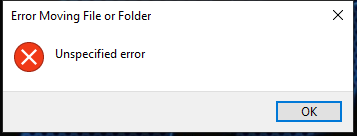
Recently updated to ESR Meadow. Now when I try to save attachment from an email by dragging and dropping to desktop, Windows pops up "Error Moving File or Folder - Unspecified error" and the operation fails. And when I try to save attachment from an email by right click > open > Save dialog, the save filename is always "nsmail" but with the original file extension. E.g. a jpg attachment would come up as "nsmail.jpg", and a txt file attachment would come up as nsmail.txt. It does then save it, but why lose the filename? It used to preserve the attachment filename, I'm sure! And drag and drop to desktop was such a convenient feature! I have tried in Troubleshoot mode and behaviour is the same. I have tried in Windows Safe mode and behaviour for Save is the same; but drag and drop is completely disabled there (when I drag it, it shows a circle with line through icon). Is it just me?
Đính kèm ảnh chụp màn hình

Tất cả các câu trả lời (2)

Ok will try that

Yes confirmed. I get "Unspecified error message"

Works by right clicking and saving to desktop :)

Được chỉnh sửa bởi amoun vào

D&D is broken in 153. It' might be a few weeks before it returns.

Đặt một câu hỏi

Bạn phải đăng nhập vào tài khoản của bạn để trả lời bài viết. Vui lòng bắt đầu một câu hỏi mới, nếu bạn chưa có tài khoản.