


Tránh các lừa đảo về hỗ trợ. Chúng tôi sẽ không bao giờ yêu cầu bạn gọi hoặc nhắn tin đến số điện thoại hoặc chia sẻ thông tin cá nhân. Vui lòng báo cáo hoạt động đáng ngờ bằng cách sử dụng tùy chọn "Báo cáo lạm dụng".

Tìm hiểu thêm
Mở

Printing Issues with documents shrinking when printing document from Firefox browser

eborger

Every time I try to print multiple copies of a document (PDF or word, not printing a webpage), the printer instead shrinks the page size to around 1/4 size on normal letter paper.

I have checked all my printer settings, reset firefox printing settings, reset computer printing settings, and gone into all the printer menus directly. Even if the page size is set to 100% size, it will still print as a 1/4 image as long as I am trying to print multiple copies directly from the firefox browser (or Firefox PDF viewer).

I also tested it on multiple printers as well as single vs double sided. On Firefox, if you print multiple copies of any document (not screenshot or print-webpage) it will shrink it into a quarter sheet. This works against double sided and single sided.

As for the types of documents: this is for every .docx or .pdf form printed off of Firefox (even pre-existing .pdf documents opened in the Firefox pdf viewer), as long as I am printing multiple copies. If I open the same .docx or .pdf in Adobe, the issue does not arise.

Both me and another coworker have the same issue (both use firefox) and other browsers do not have the same shrinking issue while printing. I believe it started around a month ago?
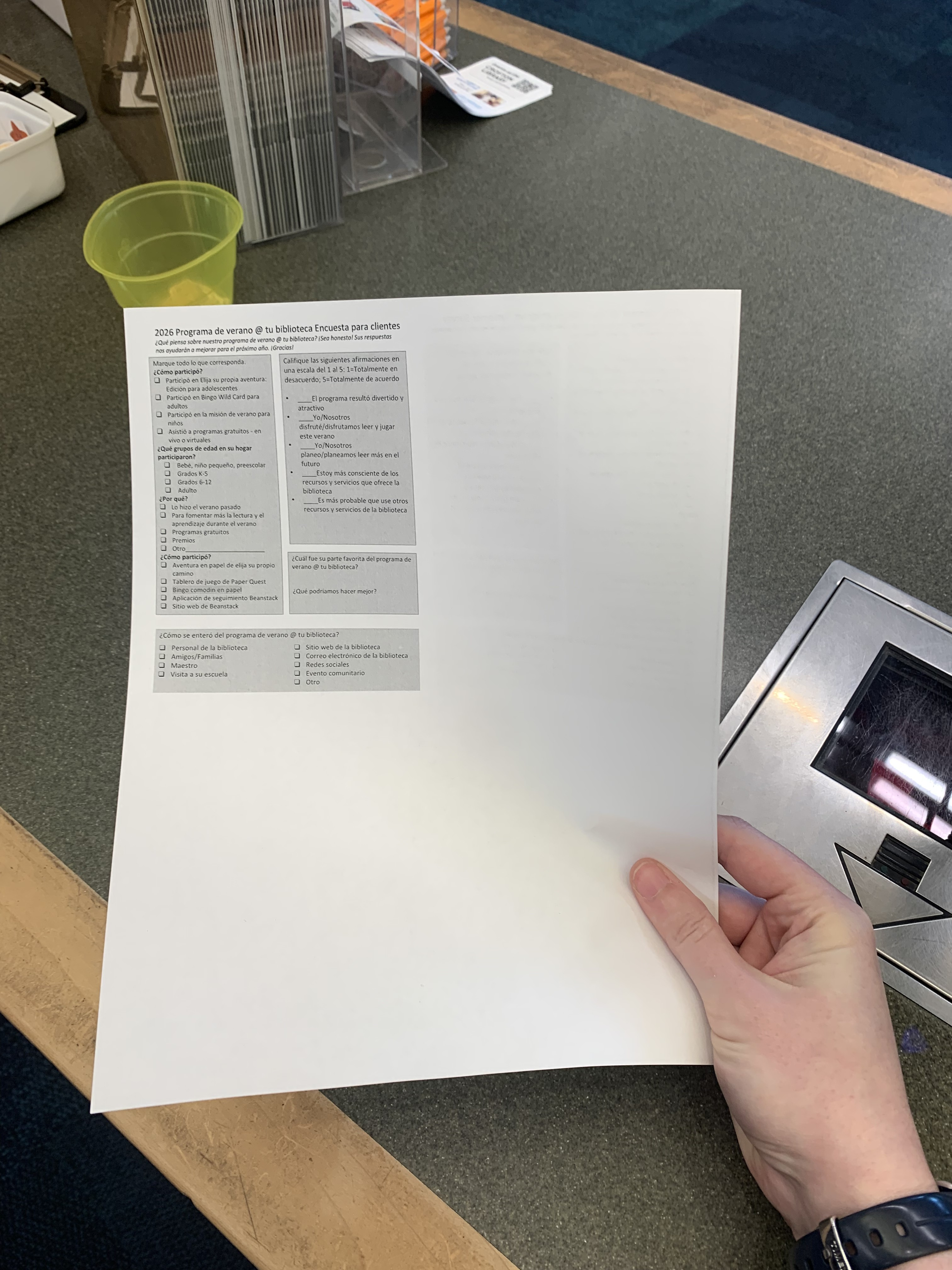
Every time I try to print multiple copies of a document (PDF or word, not printing a webpage), the printer instead shrinks the page size to around 1/4 size on normal letter paper. I have checked all my printer settings, reset firefox printing settings, reset computer printing settings, and gone into all the printer menus directly. Even if the page size is set to 100% size, it will still print as a 1/4 image as long as I am trying to print multiple copies directly from the firefox browser (or Firefox PDF viewer). I also tested it on multiple printers as well as single vs double sided. On Firefox, if you print multiple copies of any document (not screenshot or print-webpage) it will shrink it into a quarter sheet. This works against double sided and single sided. As for the types of documents: this is for every .docx or .pdf form printed off of Firefox (even pre-existing .pdf documents opened in the Firefox pdf viewer), as long as I am printing multiple copies. If I open the same .docx or .pdf in Adobe, the issue does not arise. Both me and another coworker have the same issue (both use firefox) and other browsers do not have the same shrinking issue while printing. I believe it started around a month ago?
Đính kèm ảnh chụp màn hình

Bạn phải đăng nhập vào tài khoản của bạn để trả lời bài viết. Vui lòng bắt đầu một câu hỏi mới, nếu bạn chưa có tài khoản.