


YOUTUBE CLOSE CAPTION NOT SHOWING PROPER COLORING

I DON'T KNOW WHAT HAPPENED, BUT I THINK SINCE 151 THE CC ON YOUTUBE NO LONGER RENDERS CORRECTLY. THE FONT WILL NOT SHOW UP WHITE NO MATTER HOW YOU TOGGLE AND ADJUST THE SETTINGS ON YOUTUBE. THE STOCK SETTINGS WILL SHOW GREY FONTS MAKING IT VERY HARD FOR CC USERS TO READ.
CHROME DOESN'T HAVE THIS PROBLEM AND THE FONTS SHOW PROPERLY WHITE.
Tất cả các câu trả lời (1)
Hey there, thanks for reporting. I can't reproduce it over here so I wonder if this is something on your Firefox causing this bug. Can you try loading a youtube video on troubleshoot mode and tell us if you're still getting this? Follow the next steps:
If Firefox is open, you can restart in Firefox Troubleshoot Mode from the Help menu:
- Click the menu button
 , click Help, select Troubleshoot Mode and click Restart in the "Restart Firefox in Troubleshoot Mode?" dialog that opens.
If Firefox is not running, you can start Firefox in Troubleshoot Mode as follows:
- On Windows: Hold the Shift key when you open the Firefox desktop or Start menu shortcut.
- On Mac: Hold the option key while starting Firefox.
- On Linux: Quit Firefox, go to your Terminal and run firefox -safe-mode
(you may need to specify the Firefox installation path e.g. /usr/lib/firefox)
When the Firefox Troubleshoot Mode window appears, select "Open".
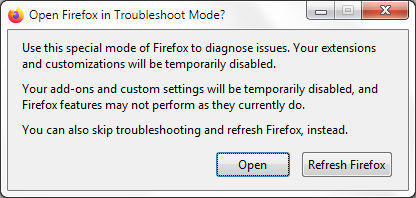
If the issue is not present in Firefox Troubleshoot Mode, your problem is probably caused by an extension, theme or hardware acceleration. Please follow the steps in the Troubleshoot extensions, themes and hardware acceleration issues to solve common Firefox problems article to find the cause.
To exit Firefox Troubleshoot Mode, just close Firefox and wait a few seconds before opening Firefox for normal use again. (If you can't exit Firefox Troubleshoot Mode, please see Firefox is stuck in Troubleshoot Mode).
When you figure out what's causing your issues, please let us know. It might help others with the same problem.
Được chỉnh sửa bởi Konstantina Papadea vào