


what is the use case for Firefox Profiles and User Profiles and how do they difer?
I can open from the user profile and than see another window with the FIrefox profiles. What is the use case for these two profiles selections?
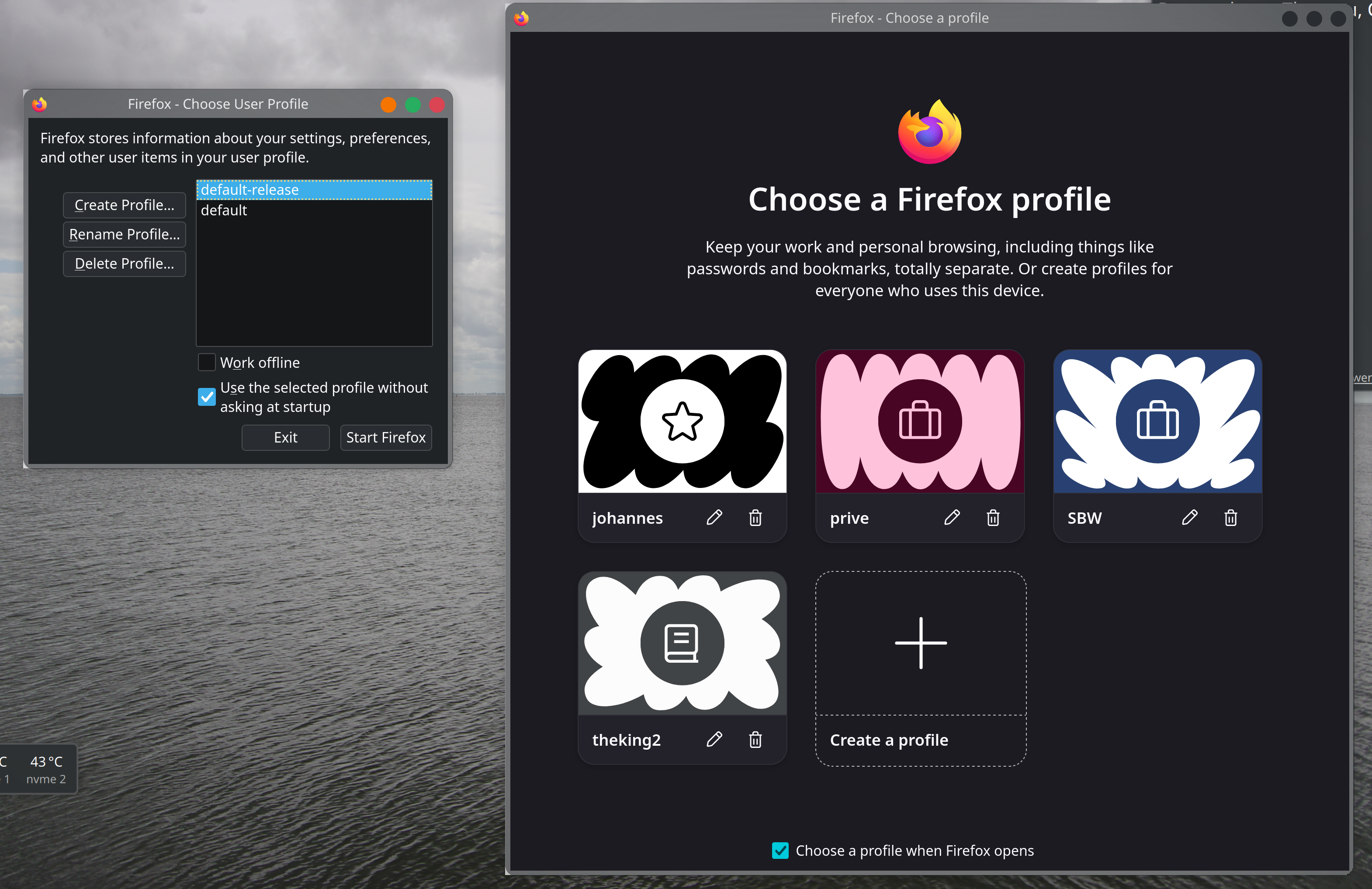
Giải pháp được chọn
Thanks! I removed the Default profile (and kept default-release)
It's a bit confusing but there probably was a reason at some point in time,.
Tất cả các câu trả lời (5)
They are basically the same thing. User Profiles is the old legacy manager. Firefox Profiles is the shiny new profile switcher. It's built for everyday use so you can easily separate work and personal browsing with cool icons.
I hope I made it clear!
Vexi
Giải pháp được chọn
Thanks! I removed the Default profile (and kept default-release)
It's a bit confusing but there probably was a reason at some point in time,.
James said
https://support.mozilla.org/en-US/kb/profile-manager-create-remove-switch-firefox-profiles https://support.mozilla.org/en-US/kb/profile-management
The first article details the traditional Profile Manager accessible via about:profiles or the -P command line, while the second introduces a newer, streamlined system accessed through the account icon in the toolbar.
The newer system offers a more visual and integrated experience, allowing you to customize profiles with unique names, themes, and avatars directly from the Firefox interface, a feature absent from the classic manager.
A key functional difference is that the new system includes a "Copy a profile" feature, letting you duplicate an existing profile with all its settings and data, which the older method does not support.
The classic Profile Manager provides options like "Work Offline" and the ability to "Use the selected profile without asking at startup", which are not mentioned in the newer management article.
Conversely, the new system introduces a startup preference where you can simply "Choose a profile when Firefox opens" from the management screen, simplifying the selection process.
The new profile management is a gradually rolled-out feature, so it may not be visible to all users, whereas the classic about:profiles page remains universally available as a fallback.
A critical technical distinction is that the new system prevents multiple profiles on the same device from syncing to the same Mozilla account, a safety measure not highlighted in the classic article.
The classic manager is the recommended tool if you need to rename the profile's display name without renaming its folder, or if you have multiple Firefox installations and need to target a specific one.
While the classic article focuses on manual backup and recovery, the new article suggests creating a Mozilla account for each profile as the best way to protect and sync your data.
Finally, the new article explicitly recommends Multi-Account Containers as an alternative for lighter separation, whereas the classic article does not mention this extension, focusing solely on full profile management.
Just a note:
I removed the Default profile (and kept default-release) It's a bit confusing but there probably was a reason at some point in time,.
I'd advise against removing that. While I also find it somewhat confusing that even out of the box it comes with the unused "default", there might be things relying on it. (E.g. the update functionality perhaps?)
Maybe someone more knowledgeable will confirm it's safe to remove it, but since the browser comes with it from the factory I'd generally recommend leaving it in place, albeit unused from the consumer perspective.