


What is "net.thunderbird" integration in 152.0?

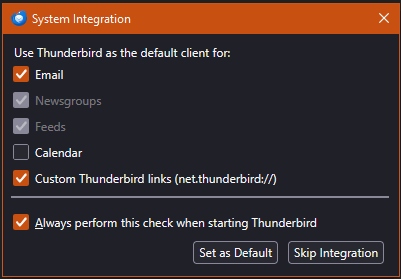
On upgrade to 152.0, a pop-up asked for options I have not seen before. I cannot find info about what the net.thunderbird option is, nor why I would or would not want to click it? Any help out there?
Thanks!
Tất cả các câu trả lời (8)
Which version of Windows?
Windows 10. What is net.thunderbird? Do I want it integrated?
I reviewed the Windows 10 info, and it appears all supported for me, if that helps.
Được chỉnh sửa bởi psig vào

I saw that too at, the update to v152.0. Using Win11 Pro 25H2 build 26200.8655. Appears 'Always check to see if Thunderbird is the default mail client on startup' had become enabled - not by me. It didn't happen at the Beta update to 153.
- What is net.thunderbird?
- Do I want it integrated?
Perhaps there are other issues to be addressed, but for now I am required by Thunderbird to answer the pop-up. Unfortunately, I do not know how to answer without those simple answers that I cannot seem to find in Help or in searches. Assistance is appreciated.
psig said
# What is net.thunderbird?Perhaps there are other issues to be addressed, but for now I am required by Thunderbird to answer the pop-up. Unfortunately, I do not know how to answer without those simple answers that I cannot seem to find in Help or in searches. Assistance is appreciated.
- Do I want it integrated?
I'm not exactly sure what Custom Thunderbird links are, but my guess is that they would open in the Thunderbird browser vs. a regular browser. You should enable that, along with 'Email' and any of the others you want, and enable 'Always perform this check...' too Then press the 'Set as Default' button and restart TB. At that point, you shouldn't get the popup any more.
Ed said
I saw that too at, the update to v152.0. Using Win11 Pro 25H2 build 26200.8655. Appears 'Always check to see if Thunderbird is the default mail client on startup' had become enabled - not by me. It didn't happen at the Beta update to 153.
Actually, that option had become disabled. Which makes the question of 'why the popup?' even more interesting.
Ed said
I'm not exactly sure what Custom Thunderbird links are, but my guess is that they would open in the Thunderbird browser vs. a regular browser.
Thanks for the shot at it. If it opens a web link, I would want to view it in my regular browser with all the browser features I use — unless there is a special purpose or use for net.thunderbird? Without more info, I will have to default to not selecting it, also hoping I can reverse that decision in the future when I know something about it.
I would still appreciate any specific info on what it is? Any way to get info from Mozilla about it?
I saw something just the other day about using some sort of Thunderbird specific links for oauth authorization. But I do not recall the exact bug.
Found it. https://bugzilla.mozilla.org/show_bug.cgi?id=2033654
It is to enable the automatic configuration of the new Thundermail product with a URL. See https://www.tb.pro/en-US/