Hi Christopher,
First, to clarify that Firefox is your web browser, while Google is a search engine you use within it.
Regarding Mozilla's data security, Firefox is highly encrypted. For instance, when you use Firefox Sync to sync your bookmarks or passwords, your data is fully end-to-end encrypted. This means not even Mozilla can read it. Is it secure?.
However, since you are looking for an alternative search engine to Google, you can change it.
You can choose from different search providers, such as Google or Bing, when you search the web using Firefox. To change the default search engine that Firefox uses:
- Click the menu button
 and choose Settings.
- Select Search in the left pane.
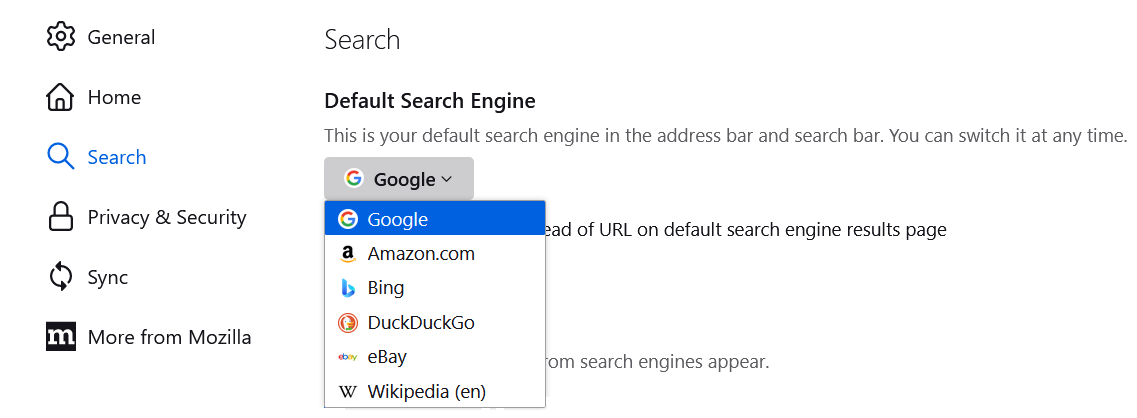
- Use the drop-down menu under Default Search Engine to choose the search engine you wish to use by default.
-
For more information, see Manage Firefox search settings.
Let us know if this helps!
Hi Christopher,
First, to clarify that Firefox is your web browser, while Google is a search engine you use within it.
Regarding Mozilla's data security, Firefox is '''highly encrypted'''. For instance, when you use Firefox Sync to sync your bookmarks or passwords, your data is fully end-to-end encrypted. This means not even Mozilla can read it. [https://support.mozilla.org/en-US/kb/sync#:~:text=Sync%2E-,Is%20it%20secure Is it secure?].
However, since you are looking for an alternative search engine to Google, you can change it.
You can choose from different search providers, such as Google or Bing, when you search the web using Firefox. To change the default search engine that Firefox uses:
# Click the menu button [[Image:Fx89menuButton]] and choose '''Settings'''.
# Select '''Search''' in the left pane.
# Use the drop-down menu under ''Default Search Engine'' to choose the search engine you wish to use by default.
#; [[Image:Fx122settings-DefaultSearchEngineDropdown]]
<!--{for not fx121}[[Image:Fx115settings-DefaultSearchEngineDropdown]]{/for}{for =fx121}[[Image:Fx121settings-DefaultSearchEngineDropdown]]{/for}{for fx122}[[Image:Fx122settings-DefaultSearchEngineDropdown]]{/for}
{note}-->
For more information, see [[Change your default search settings in Firefox]].
Let us know if this helps!



