


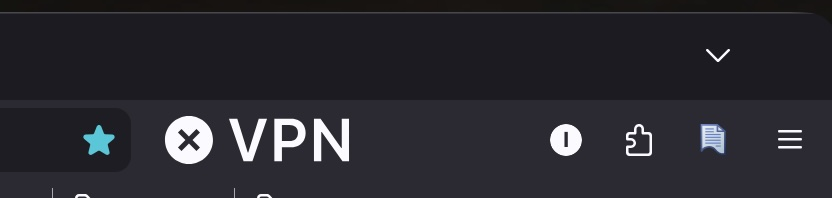
VPN icon in Firefox 151.0.2 got huge.

Don't know what happened but suddenly the VPN icon got huge after an update to FF151. It may have happened after I installed Nightly. Don't remember. Any idea how I can fix it?
Giải pháp được chọn
Thanks once again. That actually worked this time. When 153 was first released I tried that setting in vain. Beats me.
Đọc câu trả lời này trong ngữ cảnh 👍 0Tất cả các câu trả lời (6)
So many people are looking for their VPN icon so perhaps a decision was made to make it more visible?
(No, really: Fix is shipping next week in 151.0.3 — if you wanna tinker with browser CSS you can find the rules necessary in bugzilla if you feel like experimenting, but this will otherwise fix itself in a few days during the next update.)
We'll see what happens :) Thanks for the reply. I didn't know if it was just me.
Previous https://support.mozilla.org/questions/1584101 has a link to the bug, with the rule that's broken. The plan is to ship during Tuesday, and roll out progressively over the week if all goes well.
Thanks again. I'm normally using Nightly but so far it doesn't have the VPN option.
👍 🚀 Your Nightly might not be getting the same "production" rollouts as the release version, but if you want to nudge it a little more manually, you can find some inspiration here: https://support.mozilla.org/questions/1578173 … so that you don't need to use two separate browsers;) 🌘
Giải pháp được chọn
Thanks once again. That actually worked this time. When 153 was first released I tried that setting in vain. Beats me.