


Start Page Needs Better Customization!
I like the concept of having various news articles & topics of interest on the Start Page. However, I don't like the fact that many of the links take me to "subscriber only" sites, and ones that I have no subscription to! We should be able to eliminate those sites we can't read the articles on, it would be pretty easy to have that option, instead of our having to waste time, going on wild goose chases!
And I first attempted to log in to the feedback & suggestions page, however Firefox's own password auto-fill, kept putting in the wrong password, (one for a completely different site), and when I searched to find the correct password, it was too late. Soon as I entered the correct one, it locked me out, saying too many consecutive attempts had been made! To make it worse, the error message gave no info as to what my next step should be!! It didn't say to try later, how much later, provided no link to a page to reset my password, no "forgot password" option, nothing. Why is logging in on Mozilla's own, various sites, always seem to be so buggy? I've had more issues just trying to log in, than I ever should have, no idea why this happens so often, although with the auto-fill inputting the wrong information, that could be one reason.
Tất cả các câu trả lời (3)
Hi Steven, for customizing what you see in the start page, you can see how to do that here: https://support.mozilla.org/kb/about-new-tab-page#w_recommended-stories
Now on firefox auto-filling the wrong information, are you sure you have saved the password under the right URL? Most of the times that can cause the issue to filling the wrong info.
Konstantina, Thanks for your response, however, it doesn't address my question. There's no way, as shown on the start page, that would allow me to delete seeing articles from sites that require you subrscribe, in order to read them. They just take up space, are not relevant, yet there's appears to be no way to fix this.
As for the auto-fill, if Firefox saves my passwords, then it should know which password goes to which of their own urls. It seem to know how to sign me in to my Firefox account, but slips up at times, when it comes to signing in to Mozilla. Also, I recently had FF suggest a new password to a site, then signed me in. However, had I not copied & pasted it into my Appel keychain, I would not have been able to sign back in, for when I tried to, FF auto fill didn't do anything! Which is the worst thing that can happen, I let FF set up a new password, then since it for some reason didn't save it, when I try to sign back in, I can't, cause I assumed Firefox's password manager's got it. SInce I don't want that to happen, I will save new passwords manually, so I don't have to depond on FF's autofill....
Hey Steve, now I get it, yes I thin you're right about not having articles you need to subscribe under suggested. As this is not a bug, I would suggest that you open a feedback request on connect about it: https://connect.mozilla.org/ On the second question, I wonder if something interferes with saving passwords. Can you try Firefox on troubleshoot mode and see if it happens again?Hello,
If Firefox is open, you can restart in Firefox Troubleshoot Mode from the Help menu:
- Click the menu button
 , click Help, select Troubleshoot Mode and click Restart in the "Restart Firefox in Troubleshoot Mode?" dialog that opens.
If Firefox is not running, you can start Firefox in Troubleshoot Mode as follows:
- On Windows: Hold the Shift key when you open the Firefox desktop or Start menu shortcut.
- On Mac: Hold the option key while starting Firefox.
- On Linux: Quit Firefox, go to your Terminal and run firefox -safe-mode
(you may need to specify the Firefox installation path e.g. /usr/lib/firefox)
When the Firefox Troubleshoot Mode window appears, select "Open".
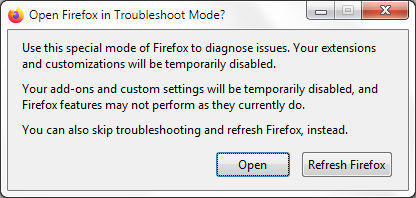
If the issue is not present in Firefox Troubleshoot Mode, your problem is probably caused by an extension, theme or hardware acceleration. Please follow the steps in the Troubleshoot extensions, themes and hardware acceleration issues to solve common Firefox problems article to find the cause.
To exit Firefox Troubleshoot Mode, just close Firefox and wait a few seconds before opening Firefox for normal use again. (If you can't exit Firefox Troubleshoot Mode, please see Firefox is stuck in Troubleshoot Mode).
When you figure out what's causing your issues, please let us know. It might help others with the same problem.