


My Fairfax browser crashed yesterday and all of my thousands of bookmarks have been erased. Additionally, even the stored backup copy was erased yesterday.
While launching Firefox VPN browser all of my bookmarks were erased. Additionally, my backup copy of my bookmark records was also deleted. I have not been able to reboot or restore the system. I need help.
Giải pháp được chọn
RDESCo2T, you could try the steps in this article to see if your bookmarks can be found in a different profile: https://support.mozilla.org/en-US/kb/recover-user-data-missing-after-firefox-update
Đọc câu trả lời này trong ngữ cảnh 👍 0Tất cả các câu trả lời (5)

Giải pháp được chọn
RDESCo2T, you could try the steps in this article to see if your bookmarks can be found in a different profile: https://support.mozilla.org/en-US/kb/recover-user-data-missing-after-firefox-update
Yes, About:profiles (about:profiles) has 6 different profiles. None of them has the bookmarks.
Any other ideas?
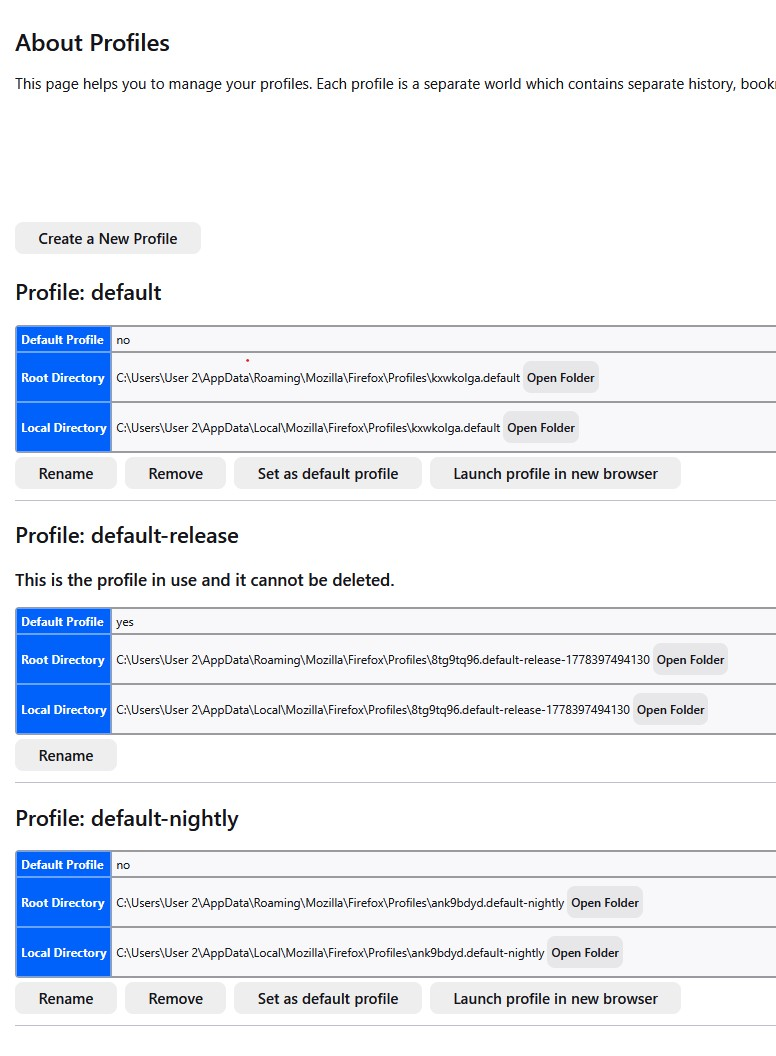
Searched: "does MS systems "Restore" also restore Firefox bookmarks?" It says "yes" in a search. However, when I tried this it did not work.
Any other thoughts?
Something else is strange about this. I backed up my Firefox bookmarks 3-days ago. On a separate (non-C) drive.
When I tried to use the stored bookmark file, it had been deleted. And its not in my Recycle Bin.
Additionally, Ive tried loading saved, 5-week old HTML, bookmark file. However, Firefox is not downloaded this file. Yet, I can download it into other browsers.
If you delete Firefox form a hard drive, and reload it; Is this an option for recovering the former bookmarks?
Please advise
RDESCo2T, when you say that the html won't download into Firefox, are you trying to import it via the "Import Bookmarks from HTML" option under the Import and Backup menu within the Bookmarks Library?
If so, then perhaps there is something wrong with the bookmarks system of your profile? It might be worth checking the integrity of the Places Database files, which are where Firefox stores bookmarks and their icons. Hopefully this check will be enough to fix any such problems and allow the html file to import.
If that doesn't help, then rather than reinstalling Firefox, you could create a new profile via the options in About:profiles and then see if the html backup imports into this new profile.
But first, To verify the integrity of the Places Database files of the current profile:
- Go to Help menu (press alt+H).
- Select "More Troubleshooting Information".
- On the page that opens, scroll down to "Places Database" and press the "Verify Integrity" button.
- Once the check has finished, Look for any lines in the report that startt with a "-" or that contain the term "error".
If any errors are reported, try restarting Firefox and re-running the integrity check to see if they were fixed by the first check. You may want to repeat this 'restart and re-check' process again if errors are still found.
Được chỉnh sửa bởi TechHorse vào