


I have, in effect, installed Thundebird on a new computer, but my attempts to setup my account aren't working.

I have created an account instance in account settings, and the "Test connection to server" says it is OK, but when I go to the mail tab the get messages button and New Message are grayed out an NO accounts are listed in the "folders" area. Not does it ever ask for my password to the SMTP server I have selected. I have an existing account with my own email service (Hover), and MUST connect to that. This is critical, as I need my e-mail to accomplish necessary activities.
Tất cả các câu trả lời (9)
Possibly, if you show screenshots of the account that is not working, some suggestions will come. screenshots of the server settings pane and the SMTP server settings pane should help. thank you
OK, I have added a screen shot of the account screen with the account in question. The information in there is correct. Is that what you meant by "server settings pane"? Or is that something else?
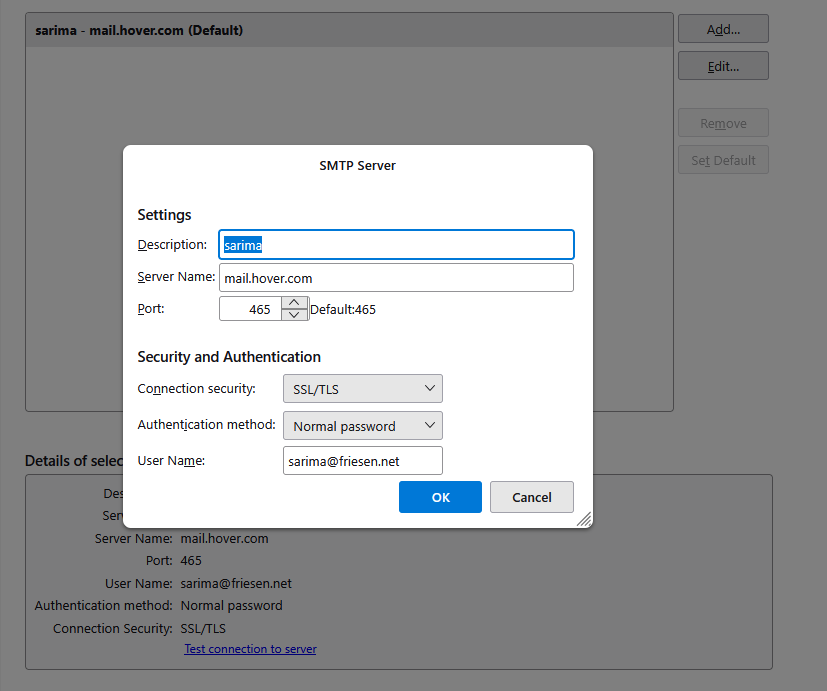
that's the outgoing server settings. the other is at the 'server settings; pane for the account..
I am not sure how to get to the other. Also, with this I would at least expect the New Message button to be active, but it isn't.
Stanley Friesen said
I am not sure how to get to the other.
To get there You either went via the account settings tab and selected (outgoing server SMTP) instead of the account or stated in the identity part of the account settings and clicked on the "Edit outgoing server" button.
Nope clicking the edit outgoing server button does not open the list of outgoing account you have in the background, so I suggest you look at the list of accounts on the left where you selected the outgoing server (SMTP) entry. Probably above the entry you chose in the list with the email address showing usually
Được chỉnh sửa bởi Matt vào
How do I add an incoming server?
Ah, I see it now. Got it.
OK, so now I need to import my local folders, filters and address book from the previous "machine". I have access to the old user account folder, including AppData. So, can I simply copy the stuff over, or do I need to do something else?
If you have a prior setup on old computer, then simply copying to new computer usually does it. here are the steps:
- ensure thunderbird is NOT running on old machine
- enter %appdata% in search window on task bar and press Enter key
- this should open windows file explorer in Appdata\roaming folder
- highlight the Thunderbird folder and copy to external media
- ensure thunderbird is installed on second computer, started once and NOT running
- enter %appdata% in search window on task bar and press Enter key
- you should be in Appdata\roaming folder. DELETE the thunderbird folder there
- now , paste your copied thunderbird folder there.
- start thunderbird and all should be there