


Windows 10 reached EOS (end of support) on October 14, 2025. If you are on Windows 10, see this article.

Tìm kiếm hỗ trợ

Tránh các lừa đảo về hỗ trợ. Chúng tôi sẽ không bao giờ yêu cầu bạn gọi hoặc nhắn tin đến số điện thoại hoặc chia sẻ thông tin cá nhân. Vui lòng báo cáo hoạt động đáng ngờ bằng cách sử dụng tùy chọn "Báo cáo lạm dụng".

Tìm hiểu thêm
Mở

(Revisted) Thunderbird is being managed by your organisation CAUSE: Bitdefender

flexible

This is a continuation of the thread - [is being managed by your organisation CAUSE: Bitdefender]

The solution of deleting the Registry Key does not work. It simply comes back after reboot. I have engaged with BitDefender support and they suggested the same thing - they also added to uninstall TB which I am not going to do.

The issue is that the BitDefender extension is not installed in a normal way, and cannot be removed. The settings in BitDefender do not make any difference, I cannot change settings in a Thunderbird account eg change a folder location, it looks like it works, but it actually does not.

I did find in the about:config extensions.webextensions.uuids key has the bdThunderbird@bitdefender.com entry but there is no indication as to what other strings belong to the entry and I do not to mess things up.

I do realize this is a BitDefender issue, and i did follow up with their support but I am wondering if anyone has solved this annoying issue.

Thanks
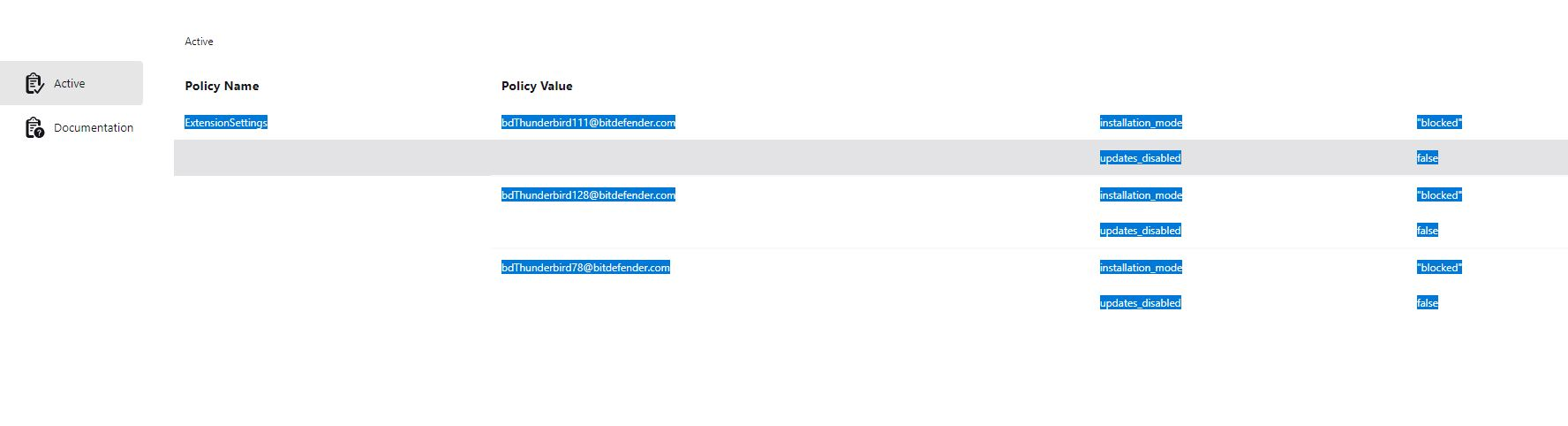
This is a continuation of the thread - [[https://support.mozilla.org/bm/questions/1533447|Thunderbird is being managed by your organisation CAUSE: Bitdefender]] The solution of deleting the Registry Key does not work. It simply comes back after reboot. I have engaged with BitDefender support and they suggested the same thing - they also added to uninstall TB which I am not going to do. The issue is that the BitDefender extension is not installed in a normal way, and cannot be removed. The settings in BitDefender do not make any difference, I cannot change settings in a Thunderbird account eg change a folder location, it looks like it works, but it actually does not. I did find in the about:config '''extensions.webextensions.uuids''' key has the bdThunderbird@bitdefender.com entry but there is no indication as to what other strings belong to the entry and I do not to mess things up. I do realize this is a BitDefender issue, and i did follow up with their support but I am wondering if anyone has solved this annoying issue. Thanks
Đính kèm ảnh chụp màn hình

Tất cả các câu trả lời (1)

The link to the other post is https://support.mozilla.org/bm/questions/1533447.

Honestly, if the reg hacks don't work any more and BD says dump TB, I'd dump BD in a New York minute. Windows Defender is all you need.

Đặt một câu hỏi

Bạn phải đăng nhập vào tài khoản của bạn để trả lời bài viết. Vui lòng bắt đầu một câu hỏi mới, nếu bạn chưa có tài khoản.