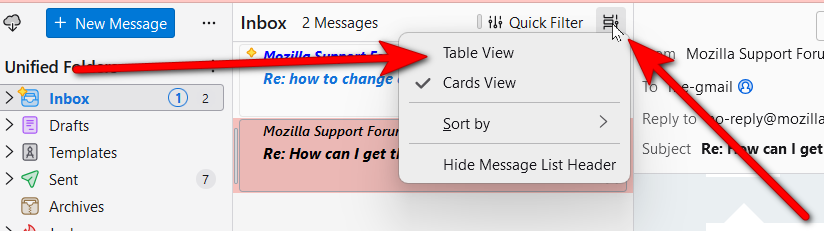
How can I get the old email listing where I click on a column to sort that column like Sender?

I can't think of another way to ask this.
Thank you,
Paul
I can't think of another way to ask this.
Thank you,
Paul
'''
Giải pháp được chọn
That is a feature in table view. At top of message view pane, just to the right of the quick filter is a small icon. Click that to change from card view to table view. You will then see the columns and you can select the FROM column and click to change sort order
Đọc câu trả lời này trong ngữ cảnh 👍 1Tất cả các câu trả lời (5)
Giải pháp được chọn
That is a feature in table view. At top of message view pane, just to the right of the quick filter is a small icon. Click that to change from card view to table view. You will then see the columns and you can select the FROM column and click to change sort order
I don't see Table View under View/ Where is Table View?
Thank you,
Paul