



Tất cả các câu trả lời (7)

Please provide more information to enable the community to help you.
What do you mean by "imap status is not current"? Are your emails updating when you press the 'Sync all accounts' button on the side menu?
I have been testing with multiple clients, 2 Android, 1 PC, 1 web client (Firefox) to https://webmail1.earthlink.net. All clients and Firefox are current as are the Pixel 9, Samsung S8 & Win11 Pro OS. Connections are imap. The account is very large, >3500 in Inbox, many folders. If I delete emails on the web client, they show as deleted on Android after TB sync. If I delete on either the Android or PC Thunderbird clients (or multiple TB clients) and TB sync, it remains as current on webmail (after Check Mail command which syncs to Earthlink servers) and other TB clients. i.e. local only. The same with moving emails to folders. Web side works, clients do local only. Also checked settings for TB sync - manual. I don't know if it's a setting or E-Link handles clients differently.
I'd recommend breaking the issue down and focusing on a single client/server interaction at a time. As this is the TB Android forum, lets start with the mobile app.
Q1) Have you changed either of the below app settings related to deletion handling?
Settings > account > fetching mail > a) When I delete a message:: [Delete from server] b) Erase deleted messages on server:: [Immediately]
Q2) Not quite sure what you mean by "after Check Mail command which syncs to Earthlink servers" Have you visually checked on the server's webmail to confirm if deletion occured, or only checked sync logs and other clients?
Q3) Do you have a trash folder setup or are you expecting the email to be permanently deleted?
Q4) Have you checked what settings are setup on your providers webmail for Imap deletion handling? See the attached from gmail web settings as example.
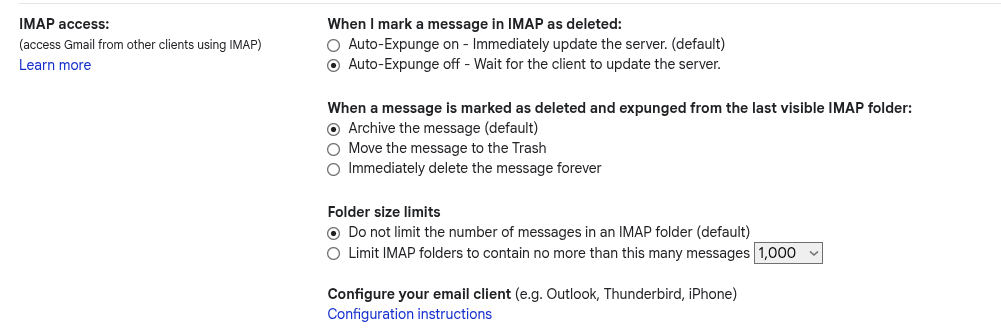
Q1. Both settings agree with yours.
Q2. "Check Mail" is an Earthlink webmail function to retrieve/sync mail with the Earthlink servers. The Earthlink web client appears to be an imap front end. I have it set for manual updates.
Q3. I use a Trash folder for Deleted mail. Mobile client mail goes to mobile trash. The problem I have is that that action is not picked up by the Earthlink servers when I Sync account or Sync All Accounts on mobile. If I move a message on mobile to a folder, say Inbox.calendar, that action is not picked up, either.
Q4. There are no such settings on the Earthlink web client. They don't have a mobile mail app, it's just for account management.
Would you be able to review or supply a debug log from Thunderbird for Android?
Please perform & capture the below actions in the log.
- Delete an email
- Move an email to another folder
- Sync the account
Guide to collect a debug log: https://thunderbird.github.io/thunderbird-android/docs/latest/user-guide/troubleshooting/collecting-debug-logs.html
What version of Thunderbird for Android are you using?
Using Android 17.0. Playstore says it is current. How do I send logs? They are verbose! Too big for screenshotd. Last entry in sync logs dated today says Error, socket exception: connection reset four times.
Apologies, I forgot this forum doesn't support file uploads.
Try searching the log for the below strings and review entries in their vicinity. Are there any error type messages that suggest copy or delete operations were unsuccessfull.
- CommandMoveOrCopy
- EXPUNGE
- Command 'deleteMessages'
The below as example were reported after a successfull move and deletion.
Move email to folder CommandMoveOrCopyMessages: moveOrCopyMessages: source folder = INBOX, 1 messages, destination folder = Receipts/REDACTED FOLDER NAME, isCopy = false RealImapConnection: conn213163641>>> 7 UID MOVE 6423 "Receipts/REDACTED FOLDER NAME" ImapResponseParser: conn213163641<<<#null# [12, EXPUNGE] ImapResponseParser: conn213163641<<<#null# [11, EXISTS] ImapResponseParser: conn213163641<<<#7# [OK, [COPYUID, 65, 6423, 7], (Success)] MessagingController: Done processing pending command 'move_or_copy MessagingController: Command 'processPendingCommands' completed'
Delete Email MessagingController: Running command 'deleteMessages', seq = 52 (background priority) MessagingController: Deleting messages in normal folder, moving MoveMessageOperations: Moving message [ID: 1054] to folder [ID: 19] 'MessagingController: Command 'deleteMessages' completed