Possible Profiles Install Issue

FF 148.0 was running on MacOS with my profile as a folder (e.g, trb618r9.default) under Firefox. When I looked in history it was empty so I restarted FF, none of my tabs were there, and TreeStyleTabs didn't display. Investigating I see a new folder named Profiles that has a profile in it with the trb618r9.default name but not all the data in the original trb618r9.default. I renamed the "new trb618r9.default" and moved the original trb618r9.default to Profiles and restarted FF but still am not seeing the original fxxx data which still exists.
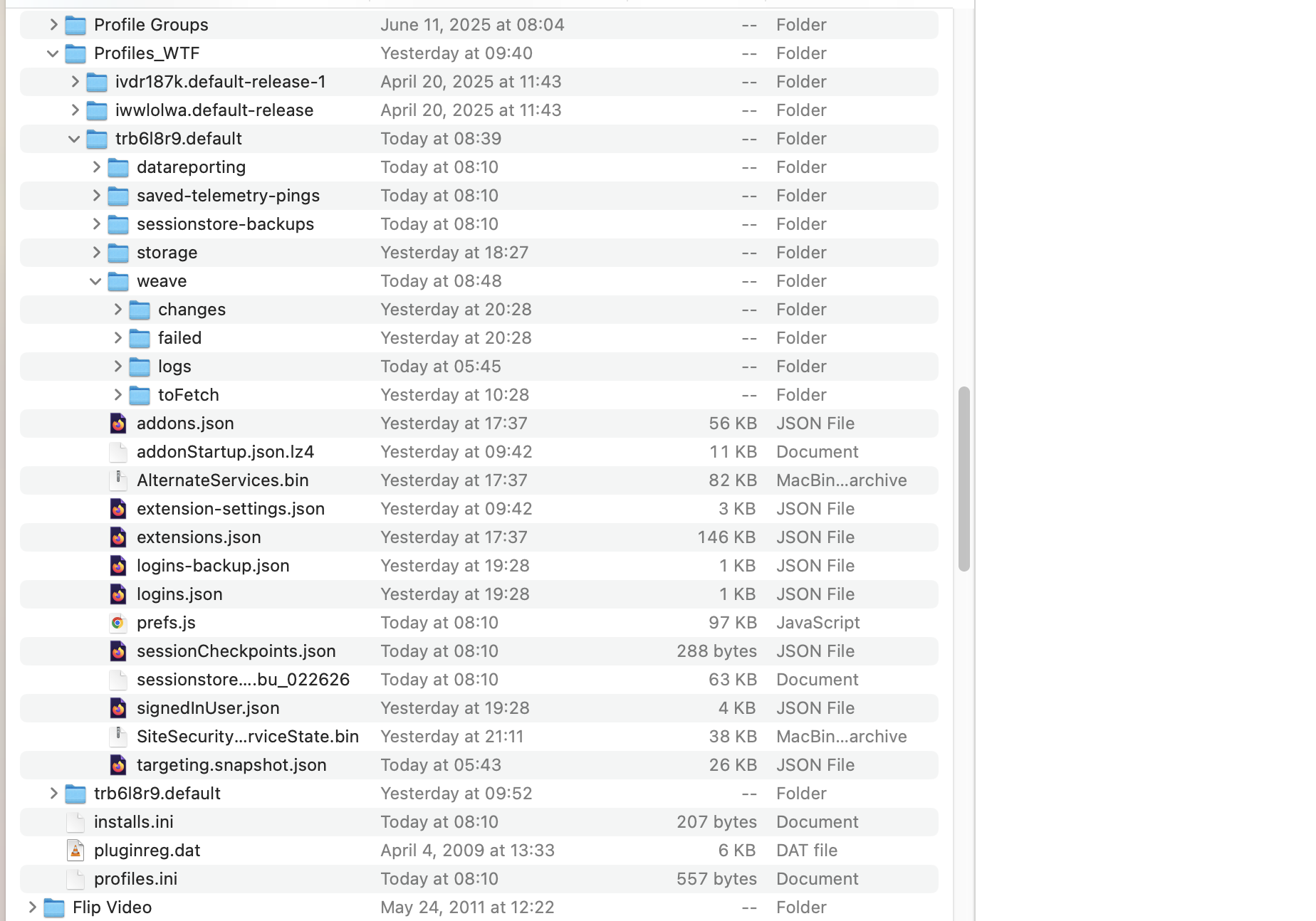
Screenshot of finder before I renamed etc. as described above shows the two same named profiles.
How can I recover?
FF 148.0 was running on MacOS with my profile as a folder (e.g, trb618r9.default) under Firefox. When I looked in history it was empty so I restarted FF, none of my tabs were there, and TreeStyleTabs didn't display. Investigating I see a new folder named Profiles that has a profile in it with the trb618r9.default name but not all the data in the original trb618r9.default. I renamed the "new trb618r9.default" and moved the original trb618r9.default to Profiles and restarted FF but still am not seeing the original fxxx data which still exists.
Screenshot of finder before I renamed etc. as described above shows the two same named profiles.
How can I recover?