


Third-party Password Managers

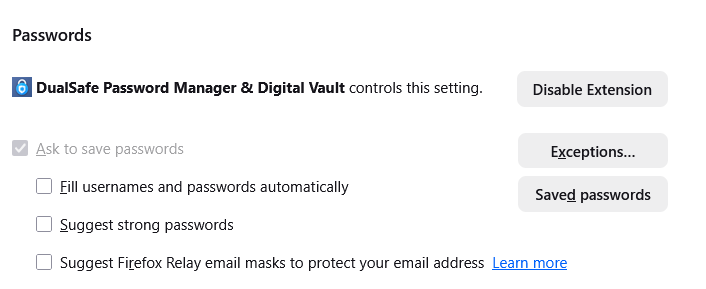
I am running Firefox 147 on a Windows 10 desktop PC. I am using DualSafe Password Manager. However, the 'Ask to save passwords' option is ticked in my Settings (see attached screenshot), and also greyed out so I can't alter it. Firefox keeps asking to save passwords for sites that I sign into. Can anyone suggest how I can fix this. To my way of thinking, if a thrid-party password manager is installed, Firefox should see this (it does) and automatically set itself to not ask.
Tất cả các câu trả lời (3)

What security software are you running? Check for Active Policies If Firefox is managed by an organization, policies may lock this setting.
Type about:policies in the address bar and press Enter. If policies are active, you may see DisablePasswordManager or PasswordManagerEnabled set to false. You will need to remove these from your system registry/plist.
https://winaero.com/remove-your-browser-is-being-managed-by-your-organization-from-firefox
You can directly edit the setting, even if the GUI is greyed out. Type about:config in the address bar and press Enter (accept the risk warning). Search for: signon.rememberSignons. If it is set to false, double-click it to set it to true.
Được chỉnh sửa bởi jonzn4SUSE vào
I am running BitDefender AntiVirus.
There are no active policies shown.
When I look at signon.rememberSignons, it is set to True. I switched it to False. I then closed Firefox. When I started Firefox again, signon.rememberSignons was set to True again!
In regard to the AI overview... - Always use Private Browsing mode is not set. - No policies are active - If I disable the DualSafe Password Manager add-on, the 'ask to save passwords' option can be accessed and unticked. However, when I enable the addin again, the option is ticked and greyed out again.
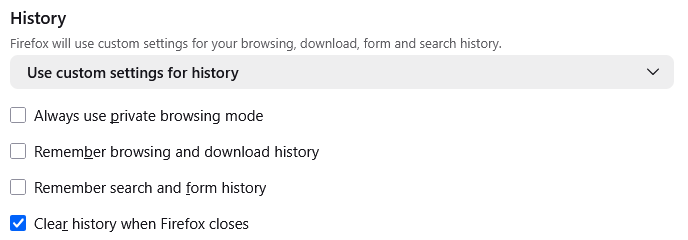
I don't know if this is a clue to what's causing the problem or not, but even if I select "never remember password" when Firefox prompts me, it will prompt me again about the same site password a number of days later. Seems like something setting is getting reset or not saved properly somewhere!