


Cannot Reinstall a Gmail Account "Unable to Log in at Server"

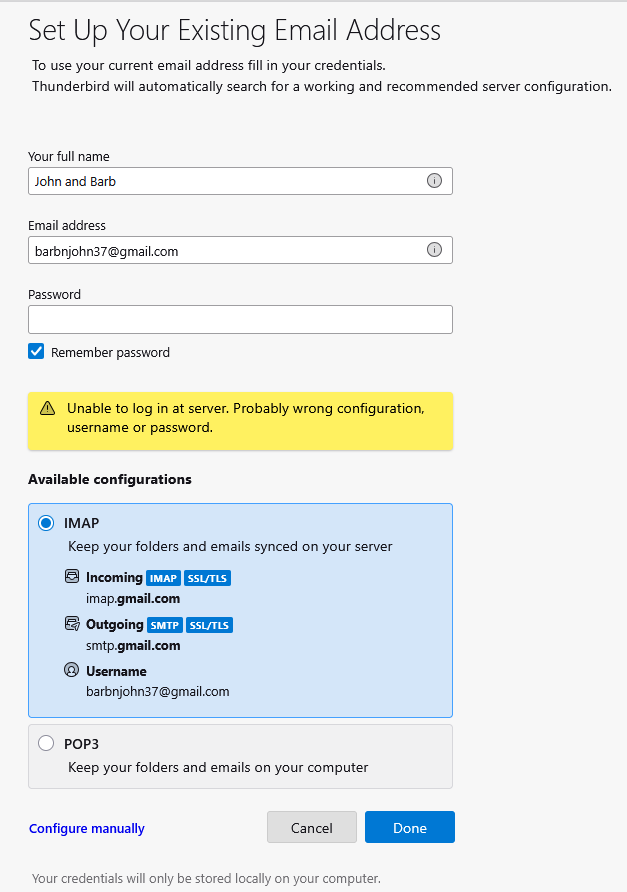
Several days ago we inadvertently deleted batches of emails from our two Thunderbird Gmail accounts on our PC and Apple devices. The lost emails were duly recovered but only after having to change my Google password. However one of our Thunderbird Gmail account will not download any new messages coming in. Ultimately we deleted that account from Thunderbird, intending to reinstall it. We deleted the account by pressing the Red button in account settings. We confirmed that messages are received to Gmail's Web page Inbox Now when I attempt to reinstall the account and press Add Account, I get the UNABLE TO LOG IN AT SERVER MESSAGE shown below. The "Your Full Name" I am putting in is the name on the Google account deleted from Thunderbird, and the password I have tried is my new Google password. I have tried the process of not adding in the password until requested to do so but this did not work either. Any suggestions please?
Tất cả các câu trả lời (2)

Are you trying to login using an App password instead of your Google account password?
Also, please post your Troubleshooting Information. At the top right of the Thunderbird window, click the menu button ≡, then select Help > Troubleshooting Information. Press the "Copy text to clipboard button" and paste the information into your reply.
Gmail uses Oauth2, so you need to make sure a few things are set up correctly first. Please work through everything - do not assume something is not relevant. It's also possible you have old passwords or an oauth token still in use.
Firewall: Access Firewall - it might be the defaulton computer or controlled by an Anti-Virus prgram. Set up Thunderbird program as 'allowed' so nothing gets blocked.
- Confirm Thunderbird is set up as allowed program.
VPN: Check computer for a VPN. Some Anti-Virus products now offer a VPN and I have come across some peopl who did not realise one had been enabled. Switch off VPN (or create split tunnelling and set it up for Thunderbird to use). Gmail does not like VPN as it atempts to hide your IP address, so gmail decides you might be hacker so it auto blocks access.
- Confirm VPN is switched off
Localhost: Do you have anything using the localhost? People who manage websites may typically use eg: Apache Xampp. You need to switch of any program using the localhost whilst setting up gmail. You can enable it again afterwards. I had to switch off Apache Xampp.
- Confirm nothing is using localhost.
In Thunderbird
- Settings > Privacy & Security
- Web Content
- Select 'Accept cookies from sites'
- Click on 'Exceptions' button
- Enter this : https://accounts.google.com
- Click on 'Allow
- Click on 'Save Changes'
Whilst in that area -
- scroll to Passwords section
- click on 'Saved Passwords'
- If you see any mention of the account you are trying to set up - select the relevant lines and click on 'Remove'
- Click on Close
I would switch off the following as it's still experimental.
* Settings > General
- Account Hub
- uncheck this checkbox: 'Create accounts in the new Account Hub'
Then create the mail account
- Menu app > New Account > Email
- Enter name
- Enter gmail email address
- Enter password - that means enter the same password you use to access webmail
- Select checkbox to remember password.
- Click on 'Continue'
Thunderbird by default will look for the IMAP server settings. They should be:
- Server name: imap.gmail.com
- Port: 993
- Connection Security: SSL/TLS
- Authentication Method: OAuth2
- Username = full gmail email address
- Password is the same one you use to access webmail
Outgoing SMTP:
- Server name: smtp.gmail.com
- Port: 465
- Connection Security: SSL/TLS
- Authentication Method: OAuth2
- Username = full gmail email address
- Password is the same one you use to access webmail
- Assuming all is ok click on 'Done'
You should then get the gmail pop up browser type window. It will ask you to confirm you really are you and the then ask if you want to allow Thunderbird access to server.
Then an OAuth token gets created and stored in the same place as all other passwords.