Profile version

Hi, how can we identify the version of a profile in order to know the appropriate version of TB ?
I am receiving a message that a newer version have modify my profile and i need the old version but it's no longer on my HD...
Thanks
Tất cả các câu trả lời (3)
Try:
   Exit Thunderbird if running.
   click windows key and 'r' key
   Enter: thunderbird.exe -P --allow-downgrade
   click on 'OK'
That should downgrade thunderbird to the prior version
Được chỉnh sửa bởi david vào
OK i understand that such procedure exist then.
I just want to clarify my problem before action... I need to install my previous version which was newer than the current one i just reinstalled. That's why i have a message that an higher version mofified my profile and the earlier won't work. So my "previous" version is in fact an upgrade compare to the current one that refuse my profile.
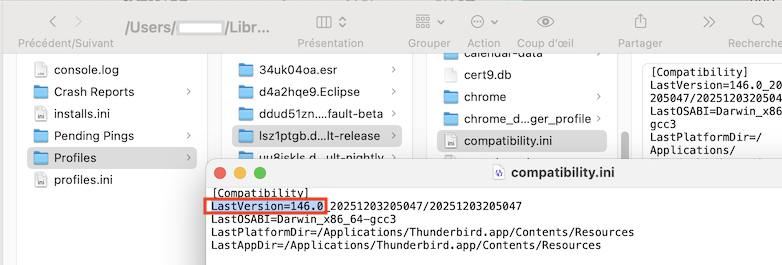
To know the Thunderbird version in which a profile has been run lately you can open the profile folder, edit the compatibility.ini file in a text editor (image) and look for "LastVersion=...." (image)