


how can a firefox145 on Win11 update be rolled back?

how can a firefox145 (on Win11) update be rolled back?
it seems update 145.0.2 has killed all audio in firefox. Other browsers and programs have functioning audio. But nothing restores audio in FireFox after the update. I have closed and re-started FF - even hot and cold reboots of the machine. It is clearly a FF issue. The only solution appears to be a roll back, unless there is a preferences line that might have been shifted.
Tất cả các câu trả lời (3)
Did you check the mixer? You can also try the reset option. see screenshot
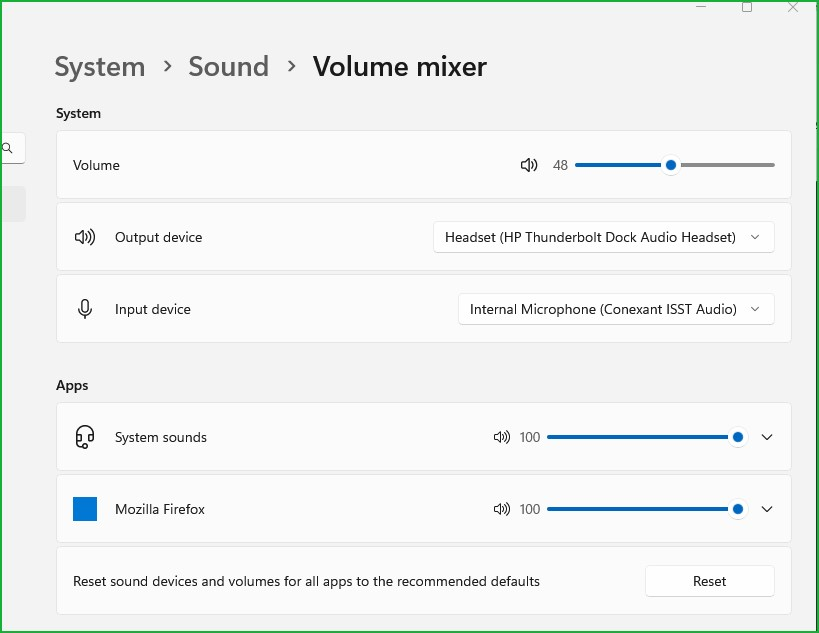
@jonzn4SUSE
Thanks for the response.
Yes, of course. As I indicated in original post, this is a FF issue not a System issue. All other System audio is functioning normally. If audio on a site or frame is needed it has to be accessed through a different browser (e.g. Vivaldi, Brave, Edge), all of which are functioning normally.
Is there a Preferences value that might be responsible for this that can be shifted?
Thanks, again.
@jonzn4SUSE
Generically, is there a way to roll-back FF updates without wiping out an installation and re-installing?
Thanks.