


my NEW MESSAGE link isn't working...i am unable to compose a new email

when i click on NEW MESSAGE....nothing happens....i am having the same issue on 2 different computers so i believe this is a thunderbird issue
Giải pháp được chọn
Can you confirm that when you open Account Settings, one account in the left pane has a yellow star next to the name (see picture)?

Tất cả các câu trả lời (10)
This a known bug that can be avoided by setting a default account in Account Settings. Select an account in the left pane, click the button in the right pane.
thanks but that didn't solve my issue
Now that you have, or already had, a default account, does the same thing happen in safe/troubleshoot mode (hold Shift when launching TB)?
thanks but this is way more technical than i can follow. i would like to mention, that altho my NEW MESSAGE link does not work, i am still able to receive emails and respond to received....just can't create a new email
once again, since this is on 2 different computers, i feel this is a thunderbird issue and hope they fix it quickly
Giải pháp được chọn
Can you confirm that when you open Account Settings, one account in the left pane has a yellow star next to the name (see picture)?
gosh....my settings doesn't look anything like yours
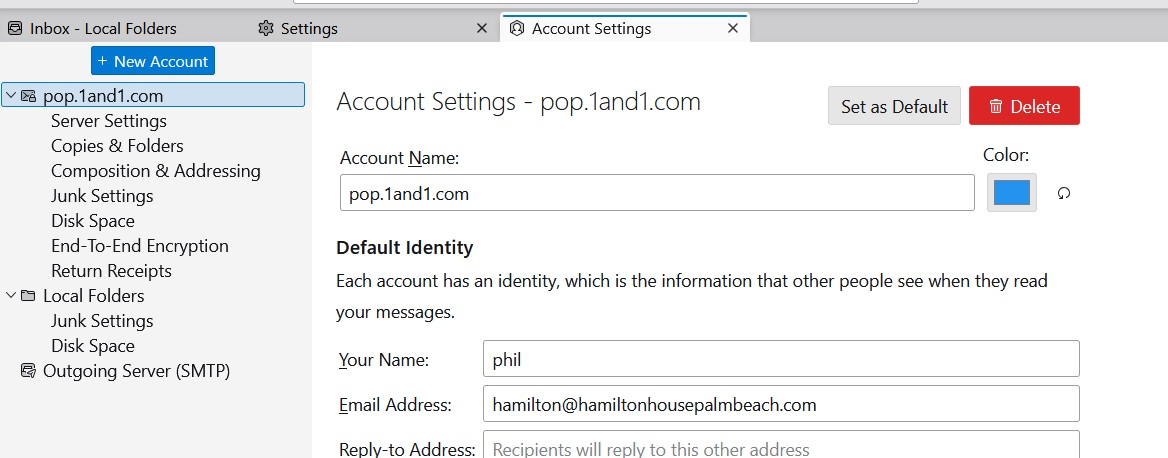
ok....i hit set as default (which i thought it was already) and the yellow star shows now and i can create new emails....thank you so much for your patience
BTW....i have used thunderbird for 20 years and have no idea why it suddenly was NOT my default as it is the only one i use

My account settings don't look like that graphic either, but I saw the comment about setting one as default, which I did. Now it works! And I have a yellow star, which was not there before. All good. Thanks!
Roger

Stort tack för snabb och värdefull hjälp! Bästa hälsningar Hasse Svenson
I already had one account as default but, to be sure, I selected another and then re-selected the original. Still, I do not have a New Message button at all. There's nothing to click on.