


Does this have something to do with Firefox?

Every so often for the past few days this "unfinished" program window has appeared on my pc on top of a normal Firefox window (see attached png). Does this have something to do with Firefox? I think the same thing appears when I first open Firefox, then it gets "filled in" and appears as a normal Firefox window. I am running Firefox 133.0.3 (64-bit) on Windows 10 Pro Version 22H2 build 19045.5247 Windows Feature Experience Pack 1000.19060.1000.0.

Giải pháp được chọn
I remembered that I had downgraded the graphics driver a while back trying to solve another issue with my pc, so I upgraded back to the latest version and the problem seems to have gone away.
Tất cả các câu trả lời (8)

Interesting, but your screenshot is not really helpful. Use this tool to see what process owns this window. https://learn.microsoft.com/en-us/sysinternals/downloads/process-explorer
I'll give it a try, but the window doesn't usually stay around very long. It also doesn't have any visible text, so I don't know how I'll be able to pick it out of the list of processes.
You just need to open process explorer, then click and hold the black x from the menu bar, then move it over the window, and then let go of the mouse button. Process explorer will then show you the process for the windows. see screenshot
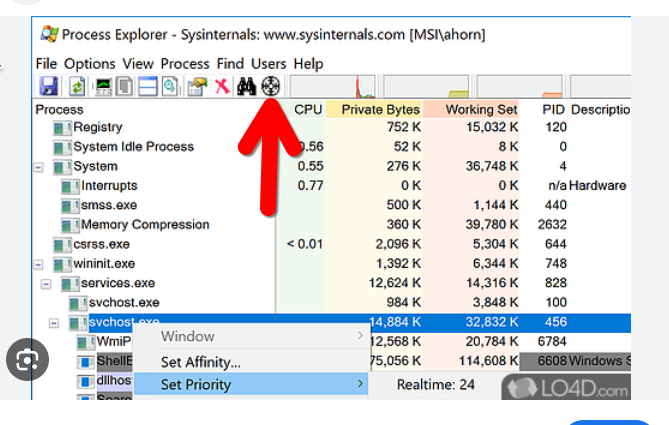
Thanks, although I'm using dark mode on my pc, so it's a white "X".
It definitely looks like a Firefox window. When Firefox is set to restore previous session windows and tabs, I think a blank window appears for several moments while Firefox processes the session history file, before it shows what you are expecting. But at least in my case, I don't think it's on top of anything.
It's definitely Firefox. Even though I haven't been able to use Process Explorer to examine the spurious windows since they've been disappearing too quickly, it's now showing the first non-pinned tab's contents instead of the blank window. Definitely on top of whatever other window happens to be in focus in that part of the screen.
Giải pháp được chọn
I remembered that I had downgraded the graphics driver a while back trying to solve another issue with my pc, so I upgraded back to the latest version and the problem seems to have gone away.