

Chủ đề này đã được lưu trữ.
Vui lòng hỏi một câu hỏi mới nếu bạn cần giúp đỡ.

Solved
Đã lưu trữ
How to configure all emails for a particular domain (*@domain.com) as NOT JUNK

Problem: How can I configure Junk Settings such that all emails from a particular domain are not treated as Junk?
In Junk Settings, I have:
- Enabled "adaptive junk mail controls" w/ "Do not automatically mark mail as junk if the sender is in: Collected & Personal Address Book".
- In "Collected Addresses" address book, I created "*@some-safe-domain.com" entry.
However, emails from that domain are still going to Junk folder.
How do I configure Thunderbird such that all emails from a particular domain are configured as NOT Junk?
'''Problem''': How can I configure Junk Settings such that '''all''' emails from a particular domain are '''not''' treated as Junk?
In Junk Settings, I have:
* Enabled "adaptive junk mail controls" w/ "Do not automatically mark mail as junk if the sender is in: Collected & Personal Address Book".
* In "Collected Addresses" address book, I created "*@some-safe-domain.com" entry.
However, emails from that domain are still going to Junk folder.
'''''How do I configure Thunderbird such that all emails from a particular domain are configured as NOT Junk?'''''
Giải pháp được chọn
then, add that action to the filter.
Tất cả các câu trả lời (5)
Create a filter for that domain appearing in FROM field and mark as not junk.
Thanks. Tried that but emails still end up in the Junk folder.
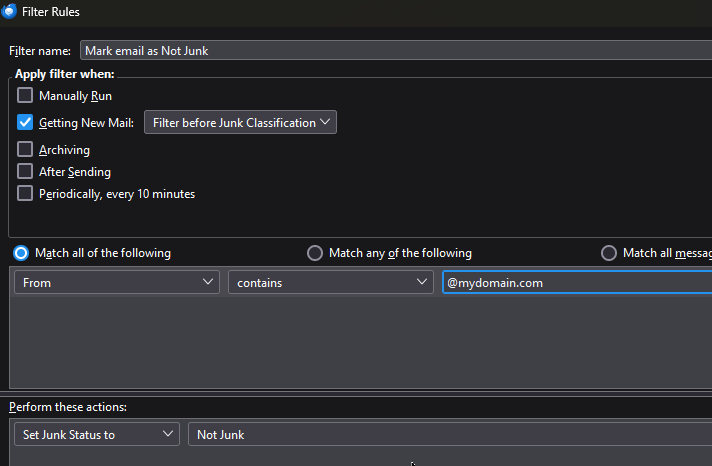
Try changing the filter to 'after' junk classification
That didn't make any difference.
I think that the Message Filter is simply/only marking the email as Junk but then not moving it to inbox.
Giải pháp được chọn
then, add that action to the filter.