


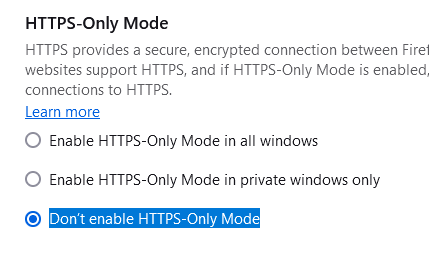
"Don’t enable HTTPS-Only Mode" is not honoured when enabled in settings

When I try to access an http:// site, the link is upgraded to https:// regardless of this setting.
This broke after a recent update to the browser. I cannot specifically say which upgrade, but it worked a month ago, now it doesn't anymore.
It may be worth noting that this broke in Brave (based on Chromium) at the same time.
When I try to access an http:// site, the link is upgraded to https:// regardless of this setting.
This broke after a recent update to the browser. I cannot specifically say which upgrade, but it worked a month ago, now it doesn't anymore.
It may be worth noting that this broke in Brave (based on Chromium) at the same time.
Được chỉnh sửa bởi Lifeboy vào
Tất cả các câu trả lời (1)
This is a bump, since I have not received any response on this issue! It's a major problem for us since we use Firefox for internal (not public) legacy sites that don't run on HTTPS