


Problem with external 365 email
Hello, I have 2 questions:
1)in my accounts I added 2 of them which are from Office 365, to do that everytime I open thunderbird, I have to confirm email and password of these two accounts. Is there a way to avoid that?
2)The two account crashes, when i log in with one, on the pop up windows of the second one appears the same (first) account, so to log in into the second account I have to "change the account" everytime. How to avoid this?
Thanks
Tất cả các câu trả lời (6)
1) per gli account Outollok·com/Hotmail/Live è necessario abilitare l'autenticazione tramite Oauth come spiegato qui -> https://support.mozilla.org/it/kb/autenticazione-oauth-microsoft-thunderbird-2023 Se si tratta di account aziendali occorre anche chiedere all'amministratore se ha imposto ulteriori misure restrittive all'accesso tramite client.
2) hai configurato separatamente i due profili SMTP per la posta in uscita?
Grazie ma non riesco a selezionare "autenticazione OAuth" come spiegato nella guida. se clicco su "Metodo di autenticazione" ho solo tre opzioni:
- Form della password compilato imprecisamente - Form della password compilato automaticamente (e se faccio questo non succede nulla) - Aprire la pagina web per il log in
next said
1) per gli account Outollok·com/Hotmail/Live è necessario abilitare l'autenticazione tramite Oauth come spiegato qui -> https://support.mozilla.org/it/kb/autenticazione-oauth-microsoft-thunderbird-2023 Se si tratta di account aziendali occorre anche chiedere all'amministratore se ha imposto ulteriori misure restrittive all'accesso tramite client. 2) hai configurato separatamente i due profili SMTP per la posta in uscita?
Grazie ma non riesco a selezionare "autenticazione OAuth" come spiegato nella guida. se clicco su "Metodo di autenticazione" ho solo tre opzioni:
- Form della password compilato imprecisamente - Form della password compilato automaticamente (e se faccio questo non succede nulla) - Aprire la pagina web per il log in
Sì ho configurato separatamente i due profili SMTP
- Form della password compilato imprecisamente - Form della password compilato automaticamente (e se faccio questo non succede nulla) - Aprire la pagina web per il log in
Puoi caricare uno screenshot di questi elementi? Non mi pare di averli mai visti
next said
- Form della password compilato imprecisamente - Form della password compilato automaticamente (e se faccio questo non succede nulla) - Aprire la pagina web per il log inPuoi caricare uno screenshot di questi elementi? Non mi pare di averli mai visti
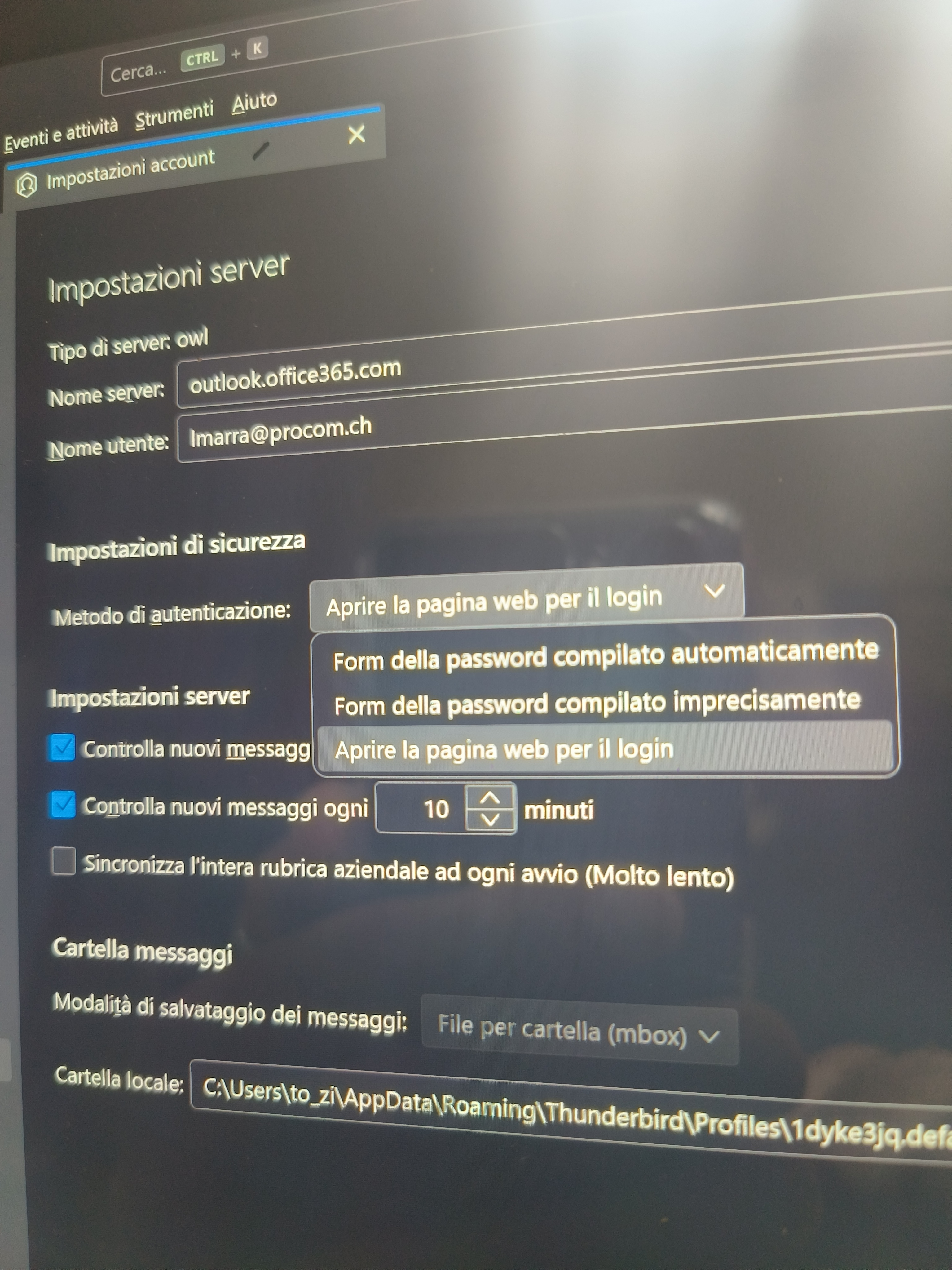
Mi spiace ma il server che utilizzi ha impostazioni NON standard. Devi chiedere a chi lo amministra.