

Chủ đề này đã được lưu trữ.
Vui lòng hỏi một câu hỏi mới nếu bạn cần giúp đỡ.

Đã lưu trữ
Can't pin certain extensions?

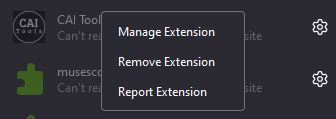
So, there's an extension I want to pin, right? It has no menu, meaning that it's grayed out usually. However, the website it's supposed to affect does not get affected. That is, unless I were to refresh the site, then quickly move my mouse to the extensions menu, open it, and show the extension.
So, there's an extension I want to pin, right? It has no menu, meaning that it's grayed out usually. However, the website it's supposed to affect does ''not'' get affected. That is, unless I were to refresh the site, then quickly move my mouse to the extensions menu, open it, and show the extension.
Tất cả các câu trả lời (1)
If the extension author didn't include a toolbar button, you can't pin its button to the toolbar.
I wonder why opening the list has an effect on whether the extension works on the page. Is it because the focus moved away from the page to a drop-down? In that case, clicking the menu button or moving the cursor into the address bar (Ctrl+L or F6) might do the same thing.