

Windows 10 reached EOS (end of support) on October 14, 2025. If you are on Windows 10, see this article.

Tìm kiếm hỗ trợ

Tránh các lừa đảo về hỗ trợ. Chúng tôi sẽ không bao giờ yêu cầu bạn gọi hoặc nhắn tin đến số điện thoại hoặc chia sẻ thông tin cá nhân. Vui lòng báo cáo hoạt động đáng ngờ bằng cách sử dụng tùy chọn "Báo cáo lạm dụng".

Tìm hiểu thêm
Đã lưu trữ

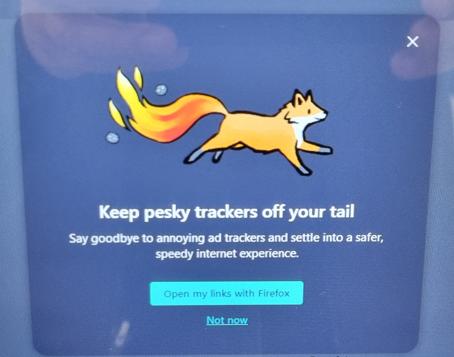
How to suppress the "Keep pesky trackers off your trail" splash screen?

ekzp

Hello Community,

I have a Citrix pooled virtual desktop environment where we use Firefox as the browser. Being a pooled collection, settings do not persist (and they _must not_ persist), therefore I push customizations with a GPO.

The problem is that every time users start Firefox, a splash screen with the message "Keep pesky trackers off your tail" appears. See attached image.

Based on the options offered on the splash screen, I suspect that this has nothing to do with tracker configuration but rather it is trying to say "Use Firefox as your default browser and you'll shake off your trackers." Another way of saying "Set Firefox as your default browser".

I enabled the "Don't Check Default Browser" policy in a GPO, as well as all options under Administrative Templates/Mozilla/Firefox/Tracking Protection. Yet this pesky splash screen keeps popping up every time and for everyone when FF is launched.

How can I suppress it using Group Policies?

Thank you.
Hello Community, I have a Citrix pooled virtual desktop environment where we use Firefox as the browser. Being a pooled collection, settings do not persist (and they _must not_ persist), therefore I push customizations with a GPO. The problem is that every time users start Firefox, a splash screen with the message "Keep pesky trackers off your tail" appears. See attached image. Based on the options offered on the splash screen, I suspect that this has nothing to do with tracker configuration but rather it is trying to say "Use Firefox as your default browser and you'll shake off your trackers." Another way of saying "Set Firefox as your default browser". I enabled the "Don't Check Default Browser" policy in a GPO, as well as all options under Administrative Templates/Mozilla/Firefox/Tracking Protection. Yet this pesky splash screen keeps popping up every time and for everyone when FF is launched. How can I suppress it using Group Policies? Thank you.
Đính kèm ảnh chụp màn hình

Tất cả các câu trả lời (2)

Do you have the UserMessaging policy set to suppress messaging?

Thanks zeroknight, I surely do not. Did not make the connection between the message and the policies. I configured them all under User Messaging. Let's see if it helps...