Can't print in Gmail

Grrr! A popup blocker may be preventing the application from opening the page. If you have a popup blocker, try disabling it to open the window.
I get this message when trying to print a gmail.
I need to print!
Thanks
Tất cả các câu trả lời (5)
And I tried removing ext's also with no luck.
To disable the popup blocker on Gmail, before clicking the print button, call up the Page Info dialog using either:
- Ctrl+i
- (menu bar) Tools > Page Info
- click the lock icon, then >, then More Information
Along the top of the Page Info dialog, click Permissions.
Then under "Open Pop-up Windows" uncheck the box for "Use default" and click the radio button for "Allow".
That is saved immediately, so you can close this dialog.
Does that make any difference?

Yes! Thank you jscher2000-- disregard my recent post about this gmail print issue - problem solved.

Thank you for answering what should have been a quick question for anyone at Google, but it seems to have evaded their vaunted expertise. What bothers me is that Safari, Edge, and Chrome had no problem printing the same email, but Firefox did. So how did Firefox end up breaking?
Hi bob36, browsers have different policies for when pages are allowed to launch popup windows, so that could explain why you get different results in different browsers.
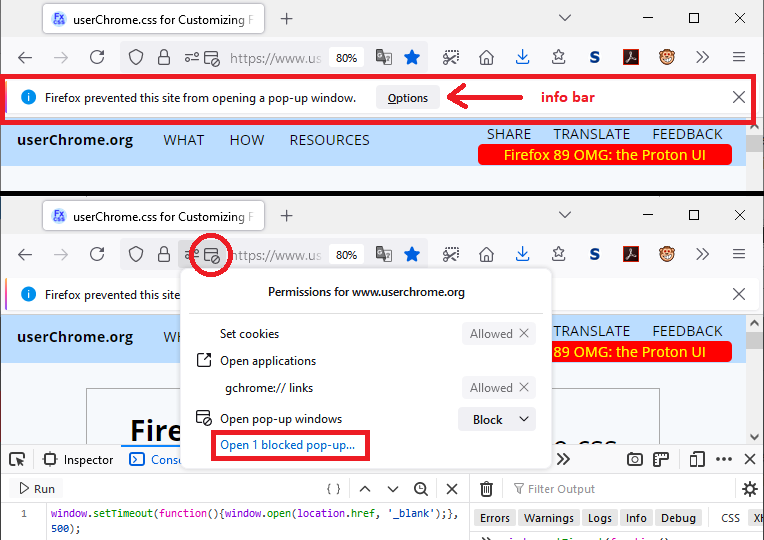
Usually if Firefox blocks a popup, you would get a notification bar or icon you can use to allow that popup or all of the site's popups. You only need to use the Page Info dialog when this doesn't appear: