


WWW-Authenticate prompt is not displaying realm

I have a web page which includes the following header:
WWW-Authenticate: Basic realm="xxxx"
where xxxx is a text string, the name of the realm. This header causes the browser to pop-up a dialogue box in which the user should enter a user name and password. The dialogue box is functioning correctly. However, there is a problem with what it displays. It should include the name of the realm ("xxxx" in this example), but it does not do so. It seems that this problem has only started occurring recently. Until a little while ago, the dialogue box used to include the sentence: 'The site says "xxxx".' Why does it no longer do so?
Tất cả các câu trả lời (11)
I don't know if I have used any servers that prompt in that way. This is what I get for IIS Windows Auth (I've covered the server name):

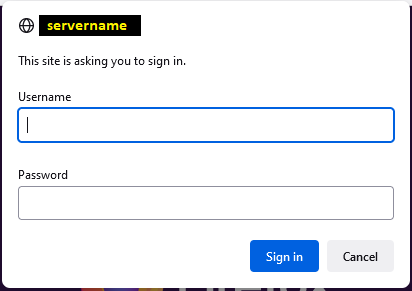
Yes. That looks like the same problem that I'm getting. It shows the server name, but not the realm. I really want it to show the realm (like it used to do), because I've got several different realms on the same server.
Sorry, I don't know how to test and compare since I don't configure servers. You could search for any bugs on file about this and, if needed, file a new one:
I don't think it is a server problem. I think it's a browser problem. My evidence for this is that it works correctly with Internet Explorer. The IE pop-up text is
The server <server name> is asking for your user name and password. That server also reports "<name of realm>".
It is that second sentence (quoting the name of the realm) that seems to be missing with most other browsers (such as Firefox and Chrome).
Right, I meant that I can't create a test case and look under the covers because I don't know how to set up such a prompt.
Do you have a lot of bandwidth and patience? You can run a regression test to isolate the patch responsible for the change:
Thanks. In principle, yes, I suppose I could try to do a regression test. However, I don't have especially great bandwidth (not sure about the patience). The test itself could be very simple. At its minimum, I think it just needs a tiny PHP file:
<?php
    header('WWW-Authenticate: Basic , realm="This is the text that should be displayed in the prompt."');
?>Được chỉnh sửa bởi cor-el vào
Sorry, my code doesn't seem to be displayed correctly. It should start with "".
Thanks, you need to use the HTML entity (<) when posting here:
<?php header('WWW-Authenticate: Basic , realm="This is the text that should be displayed in the prompt."'); ?>
Trying again: It should start with "<?php" and end with "?>".
Yes, I worked that out myself eventually!
Actually, I see that what I sent you wasn't quite right. There's an extra comma that I tried inserting to see if it would fix the problem (which it didn't). The code should be:
<?php
header('WWW-Authenticate: Basic realm="This is the text that should be displayed in the prompt."');
?>