

Chủ đề này đã được lưu trữ.
Vui lòng hỏi một câu hỏi mới nếu bạn cần giúp đỡ.

Đã lưu trữ
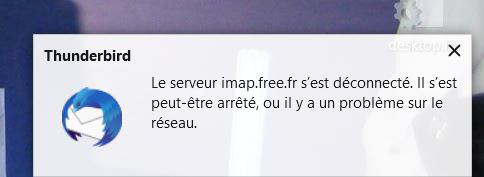
le serveur imap.free.fr s'est deconnecté

Bonjour Au démarrage de thunderbird, de façon aléatoire à d'autres moments, apparait la fenêtre en pièce jointe. Il est alors impossible d'envoyer un mail en réponse... pendant quelque temps. Est-ce un problème de configuration de Thunderbird, ou du réseau Wifi, ou d'internet, ou du système d'exploitation (Win 10 tenu à jour) ? ou autre ?
Merci
Bonjour
Au démarrage de thunderbird, de façon aléatoire à d'autres moments, apparait la fenêtre en pièce jointe. Il est alors impossible d'envoyer un mail en réponse... pendant quelque temps.
Est-ce un problème de configuration de Thunderbird, ou du réseau Wifi, ou d'internet, ou du système d'exploitation (Win 10 tenu à jour) ? ou autre ?
Merci
Tất cả các câu trả lời (1)
If you have just updated from version 68* to 78* check to see if it due to the server using out of date TLS protocols.
If you have just experienced an update and use eg: Norton 365 Anti-Virus, it is possible the Firewall thinks the updated Thunderbird is not the same program. So do the following to force it to recognise Thunderbird.
- Exit Thunderbird.
- Access Firewall
- Locate Thunderbird in list and set to 'block, then click on 'Apply' and 'OK.
- Then access Firewall again and this time set Thunderbird to 'Allow', click on 'Apply' and 'OK'.
- Start Thunderbird.