


Pinned tabs in Firefox
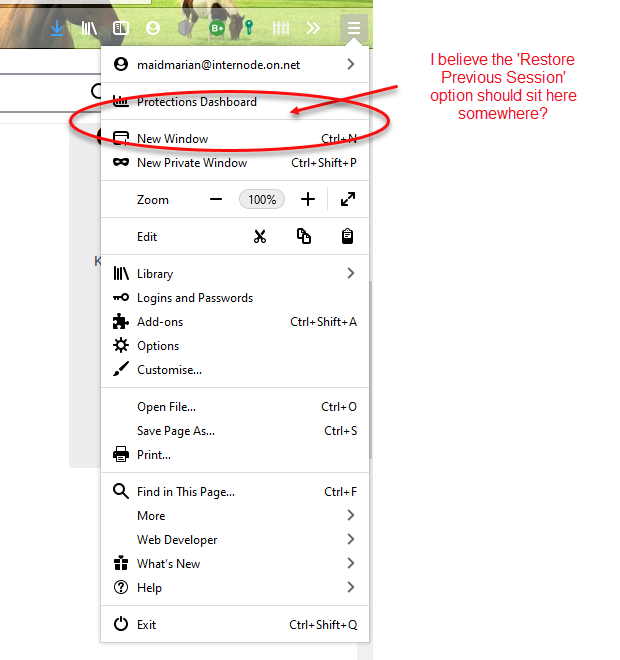
I have used Firefox for many years now and love it and keep telling my friends and colleagues to switch to this browser rather than Google Chrome.. There is something that happens irregularly with my 'pinned tabs', every now and again when I close Firefox the next time I open it up, they are all gone. I go through history and replace them and 'Pin' them and its all fine for a while then it happens again. Most recently - in the last two days it has happened twice, it takes some time for me to restore the tabs and pin them, then I have gone into 'Options' and I have set the box (ticked it) for 'Restore previous session' but its not happening. Also when I go to the 'three bars' up on the top ribbon on the far right the option to 'Restore previous session' simply isn't there! I have no idea what is happening but its very frustrating and I would really appreciate some answer as to what might possibly be going on? Many thanks for your time, much appreciate and love your work everyone.
Tất cả các câu trả lời (2)
Do you Exit out of Firefox using the menu item, either:
- "3-bar" menu button > Exit
- (menu bar) File > Exit
Using the alternate method of closing individual windows, or using "Close All Windows" on the Taskbar icon, can lead to the wrong window getting restored in your next session. Still, when that happens, it's worth immediately checking the closed windows list:
- "3-bar" menu button > Library > History > Recently Closed Windows
- "Library" toolbar button > History > Recently Closed Windows
- (menu bar) History > Recently Closed Windows
Note: by default, Firefox only keeps the last three closed windows.
If there aren't any closed windows either, possibly the session history file was damaged or deleted. That's very unfortunate. There is usually an older one Firefox can try in that case, but not always.
Are you possibly using "Clear history when Firefox closes" to clear the browsing history as that will include pinned tabs ?
In case you use "Clear history when Firefox closes" or otherwise clear history.
- do not clear the Browsing History
- Options/Preferences -> Privacy & Security
Firefox will: "Use custom settings for history":
[X] "Clear history when Firefox closes" -> Settings - https://support.mozilla.org/en-US/kb/delete-browsing-search-download-history-firefox
Notes:
- clearing "Site Preferences" clears exceptions for cookies, images, pop-up windows, and software installation and exception for password and other website specific data
- clearing "Cookies" will remove all selected cookies including cookies with an allow exception you may want to keep