


Is there a way or app to Auto edit bookmarks such that the https:// and .com/... are cut off.?

Safari auto edits bookmarks such that the https:// and .com/... are cut off, so that one can see the book mark name without all the gak.
And one can still further edit the left hand (name) column if one desires. Is there something like that for Firefox?
Giải pháp được chọn
You should click the star or drag the tab to a bookmarks folder to create the bookmark. That way you get a bookmark with title and location. If you copy the URL from the location bar then both name and location field get the same value.
Đọc câu trả lời này trong ngữ cảnh 👍 1Tất cả các câu trả lời (5)
Hi metropical, Firefox usually shows the page title on the Bookmarks Menu / Toolbar and not the page URL (unless you hover your mouse over the bookmark). Is that where you see the problem or somewhere else?
If you mean in the address bar -- showing the URL of the currently displayed page -- there isn't any setting to remove https:// from the beginning or edit the URL. By default, Firefox should be showing the domain portion in darker/heavier text for easier spotting, but I realize that isn't a lot of differentiation.
Bookmarks Menu / Toolbar better explained with the attached snap.
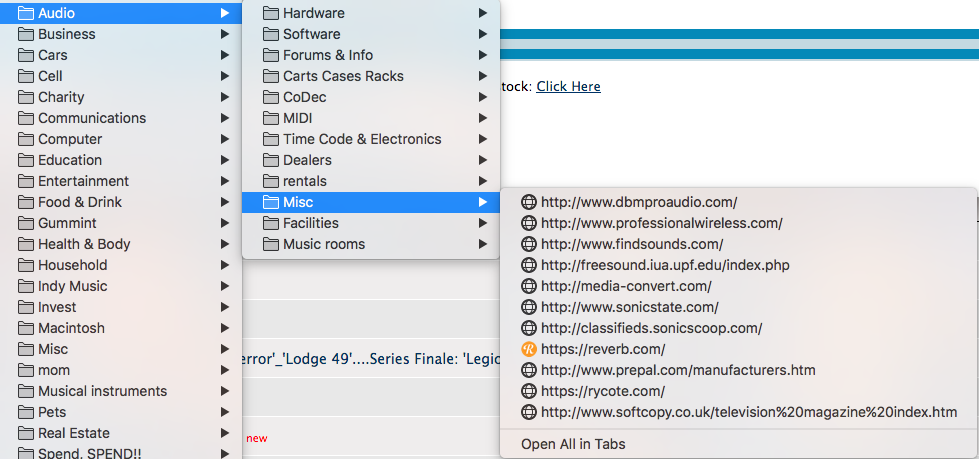
You would have to right-click each item to edit the Name field and remove the parts that you do not want to see..
Why do all these bookmarks show as a URL and do not have a specific name?
Did you do a copy and paste from another source (browser) to copy these bookmarks to Firefox ?
I don't think I c&p. I think I imported from Safari when Quantum first appeared. Some I have just copied from the address bar and pasted into (shift/Cmd/B) Bookmarks. Perhaps I'm using the wrong method to add?
Giải pháp được chọn
You should click the star or drag the tab to a bookmarks folder to create the bookmark. That way you get a bookmark with title and location. If you copy the URL from the location bar then both name and location field get the same value.