


How do I download specific, non-consecutive pages?

I am having trouble downloading PDFs with Firefox.
- I know how to download the PDF as a whole and name it accordingly.
- I cannot find how to download specific, non-consecutive pages from the PDF (example: pgs. 1,3,5). I have tried selecting the "print" button and redirecting download to my PDF program (Adobe PDF). Unfortunately, this only allows me to download consecutive pages (example: pgs. 1-5).
Any ideas?
Tất cả các câu trả lời (4)
Is the PDF initially opening in Firefox's built-in viewer? I suggest opening the whole PDF directly into Adobe and using its Extract feature instead of trying to extract from Firefox's viewer.
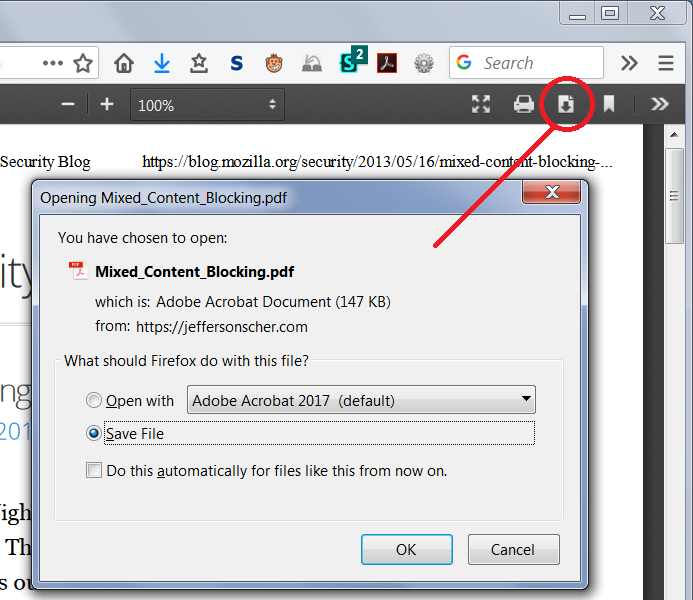
To open in Adobe, use the download button on the viewer's black toolbar:

Yes, I know you can use Adobe to open the document as you have mentioned. However, I want to know if it's possible to download specific, non-consecutive pages from the Firefox viewer.
I can use the Adobe option, but it adds time to my task whereas the preview option is much quicker - if I can figure out how to download specific, non-consecutive pages.
Unfortunately, the built-in (pre)viewer does not have an extraction feature. You cannot extract either consecutive or non-consecutive pages. You can print consecutive pages, but that will yield reduced quality compared with a true extraction.
Yes, I have been able to print consecutive pages to Adobe and save them that way, but again, only consecutive pages. Thanks for your input - I appreciate it.