


Error-Message from Mail-Server on Startup with open Password-Manager

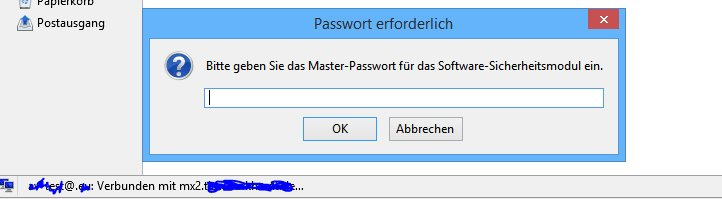
When i start TB the Password-Manager ask me for the Main-Password. When i do not write the Main-Password directly with in 60 Seconds, i get an Errormessage from the Mail-Server! Why connects TB to the Mail-Server before i write the Main-Password in the Password-Manager Inputmask? Prefs: "mail.startup.enabledMailCheckOnce", false "mail.server.server1.login_at_startup", true "mail.server.server1.check_new_mail", true "mail.server.server1.check_time", 30 "mail.server.server1.download_on_biff", true "mail.server.server1.headers_only", false "mail.server.server1.leave_on_server", false Pic 1 is direct after starting TB Pic 2 is after 60 seconds

Giải pháp được chọn
I guess this is the effect you described:
When i do not write the Main-Password directly with in 60 Seconds, i get an Errormessage from the Mail-Server!
You can try to install this add-on. https://addons.mozilla.org/en-US/thunderbird/addon/startupmaster/
This should prevent Thunderbird from trying to access the account prior to entering the master password. Note, it's by no means a security measure.
Đọc câu trả lời này trong ngữ cảnh 👍 1Tất cả các câu trả lời (4)

The password prompt is for the master password. The master password protects any account passwords you told Thunderbird to remember. Thunderbird cannot retrieve new mail without access to the account password. See http://kb.mozillazine.org/Master_password
christ1 said
The password prompt is for the master password. The master password protects any account passwords you told Thunderbird to remember. Thunderbird cannot retrieve new mail without access to the account password. See http://kb.mozillazine.org/Master_password
You're right christ1. But how do you explain to me the second screenshot? TB tries to download new messages without a master password!

Giải pháp được chọn
I guess this is the effect you described:
When i do not write the Main-Password directly with in 60 Seconds, i get an Errormessage from the Mail-Server!
You can try to install this add-on. https://addons.mozilla.org/en-US/thunderbird/addon/startupmaster/
This should prevent Thunderbird from trying to access the account prior to entering the master password. Note, it's by no means a security measure.
christ1 said
I guess this is the effect you described:When i do not write the Main-Password directly with in 60 Seconds, i get an Errormessage from the Mail-Server!You can try to install this add-on. https://addons.mozilla.org/en-US/thunderbird/addon/startupmaster/
This should prevent Thunderbird from trying to access the account prior to entering the master password. Note, it's by no means a security measure.
With an add-on to patch a bug I think is not a good idea! I consider this behavior a bug and hope that it will be repaired by this post soon.