

Chủ đề này đã được lưu trữ.
Vui lòng hỏi một câu hỏi mới nếu bạn cần giúp đỡ.

Đã lưu trữ
How can I darken the lines around a data input box on a web page?

When I am on a data input page, I can hardly see where the input box(field) is on the screen. Is there a setting I can use to highlight this space? I am using an HP Laptop with Windows 10
When I am on a data input page, I can hardly see where the input box(field) is on the screen. Is there a setting I can use to highlight this space?
I am using an HP Laptop with Windows 10
Tất cả các câu trả lời (2)
Can you attach a screenshot?
- http://en.wikipedia.org/wiki/Screenshot
- https://support.mozilla.org/kb/how-do-i-create-screenshot-my-problem
- Use a compressed image type like PNG or JPG to save the screenshot
- Make sure that you do not exceed the maximum size of 1 MB
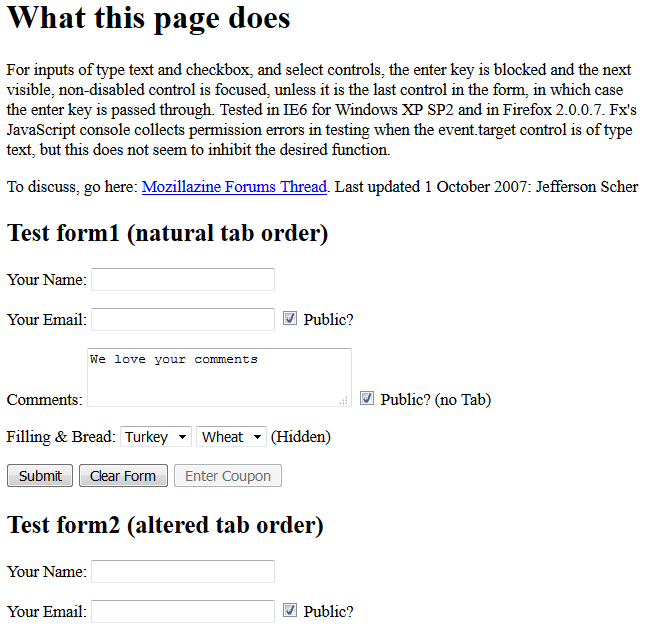
The appearance of text inputs and textarea controls may vary depending on whether the page has styled them. Here is an ancient example of completely unstyled inputs:
http://dev.jeffersonscher.com/jscher2000/Enter-Does-Tab2.html
I am attaching a screenshot from Windows 7 for reference. Obviously Windows 10 has new themes, so it wouldn't surprise me if they look different.
Được chỉnh sửa bởi jscher2000 - Support Volunteer vào