


Customize what Firefox icon appears on Windows 7 taskbar

Windows 7, 64 bit.
On my desktop, I have shortcuts for 3 Firefox accounts. And I customized each shortcut so it has its own, unique icon.
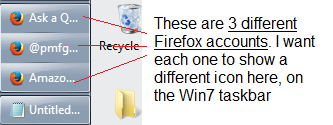
But once I open these 3 Firefox accounts, the 3 icons that appear on the Win7 taskbar are all the same - each 1 of the 3 is the default orange icon _on the taskbar_.
And so, since all 3 look the same there (and they look the same in the pop-up box if I type-hold ALT and type TAB), it is hard to switch directly to the account I want to go to.
Is there a way in Win7 to customize what icon appears in the taskbar for each, separate Firefox account?
Tất cả các câu trả lời (4)
I think that this is still valid for desktop icons:
On the Start Menu you can do this too. Right click on one of the pinned Firefox profiles, and select "Properties" In the Shortcut menu click on "Change Icon"
guigs2 said
On the Start Menu you can do this too. Right click on one of the pinned Firefox profiles, and select "Properties" In the Shortcut menu click on "Change Icon"
Thanks, but I tried to make clear that that is not my problem.
I am not referring to icons for shortcuts.
I am referring to the image that appears on the taskbar that is a link to an up-and-running program. The image that, if you click on it, it doesn't launch the program. Rather, it switches you to that program.
I attached a graphic to my first post that shows what I'm referring to.
Được chỉnh sửa bởi igorok2 vào
"3 different Firefox accounts ..." The icons look the same to me. Are those 3 separate Profiles for the same Firefox installation - i.e., the same firefox.exe file?
Yes, they are 3 separate "Profiles" for the same Firefox installation. Sorry for the terminology.
And that is why I want different icons/graphics there, so I can easily know which Profile is which and switch right to it.
Now, when I look on the taskbar (or use ATL (hold) + TAB, TAB, TAB), I can't tell which one of those icons/graphics goes with which Profile.
Được chỉnh sửa bởi igorok2 vào