


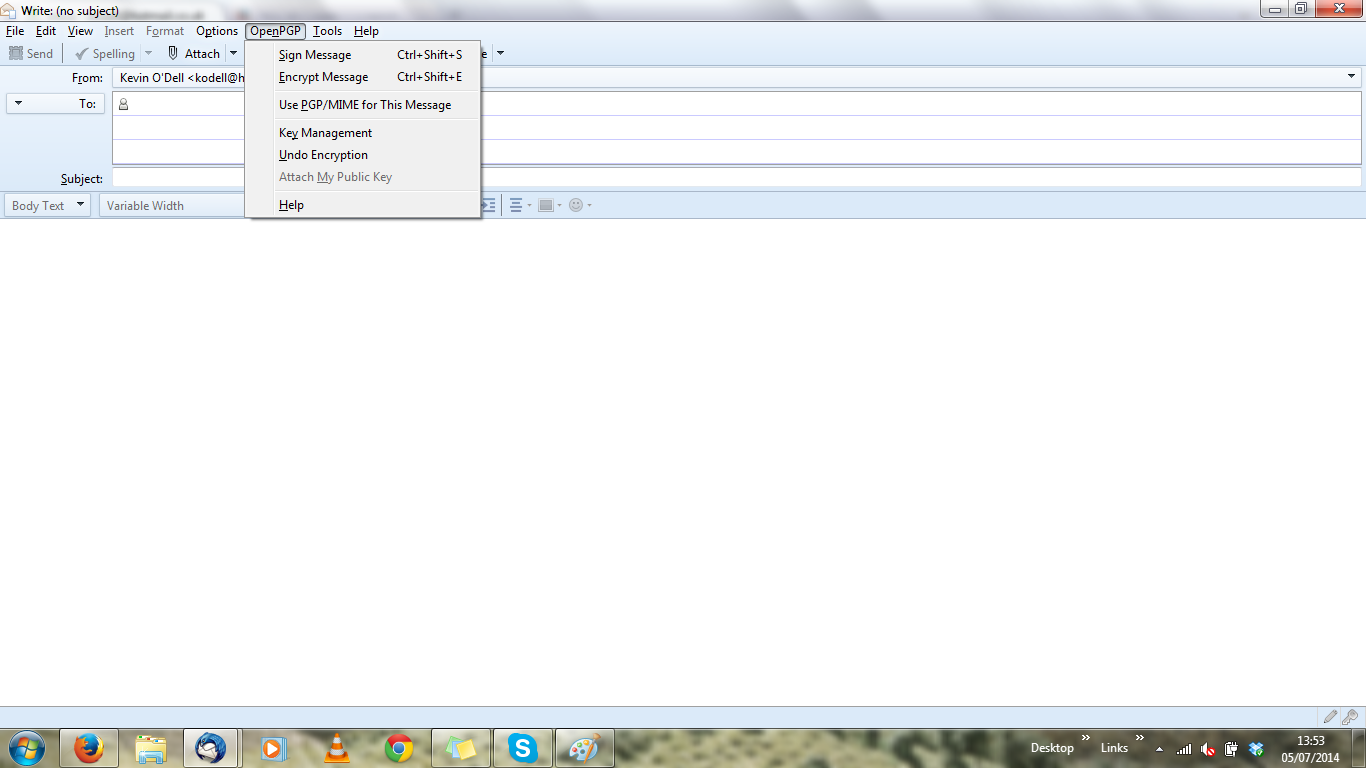
When trying to attach my key, the 'Attach My Public Key' option is blanked out so I can't use it.

This is referring to 'Digitally Signing and Encrypting Messages'. When trying to send my key by email, the 'Attach My Public Key' option is blanked out so I can't use it. I have a work around but it is a bit of a nuisance.
Any ideas?
Many thanks
Kevin

Giải pháp được chọn
When your issue has been fixed can you mark this thread as 'Solved' please? Thank you.
Tất cả các câu trả lời (5)
What exactly are you doing to attach your key?
A screenshot would probably a good idea. http://support.mozilla.org/en-US/kb/how-do-i-create-screenshot-my-problem
Hello christ1,
Thanks for getting in touch.
PNG screenshot attached.
Kevin
Have you configured your account for PGP yet? Tools (Alt-T) - Account Settings - OpenPGP Settings Choose 'Use specific OpenPGP key ID ...'
No I hadn't but now I have done it and the option is there.
Many thanks, christ1.
Kevin
Giải pháp được chọn
When your issue has been fixed can you mark this thread as 'Solved' please? Thank you.