


Firefox - Language loose

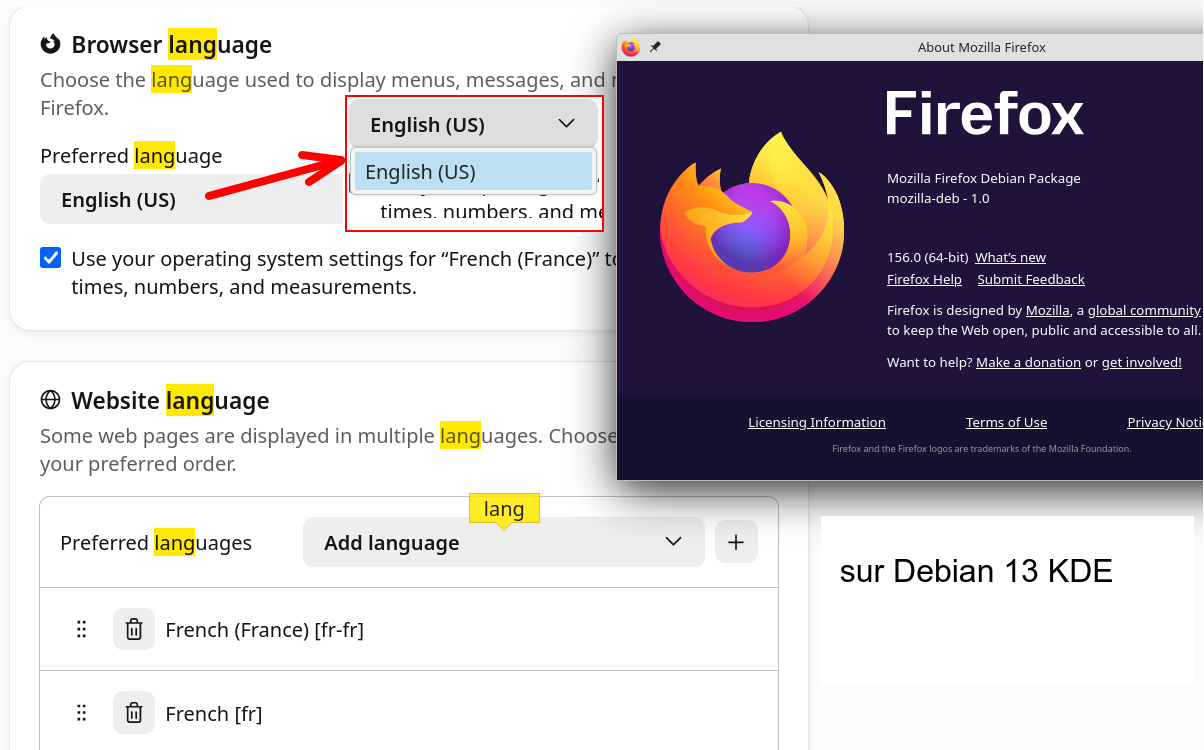
Hello, The language setting is lost with every update. Currently, I can only select "English". Best regards,
All Replies (2)
How do you install your Firefox (or it's just preinstalled out of the box for you)? And how do you update it? (Does it run its own updates, or you do that from outside, using e.g. a package manager?)
Language packs are in a form of an addon. And their version must match the browser. When you lose a langpack it's usually logged in the console that a matching version was not available on launch. It should have been, if you've been running the previous version at least for a while.
But on Linux the locales are usually brought in differently, via a sibling package, so it works a bit differently — based on how it was installed and how its updates are managed.
The details are described in Install Firefox on Linux article in its "Use different languages on Firefox DEB package" section in case you use the official repo.
If you have your install outside of any package management, you can get the tarball from firefox.com/download/all including the default locale right away in it, so it will also update just using that localization channel.