

This thread was archived.
Please ask a new question if you need help.

Solved
Archived
Make menus higher
Hello,
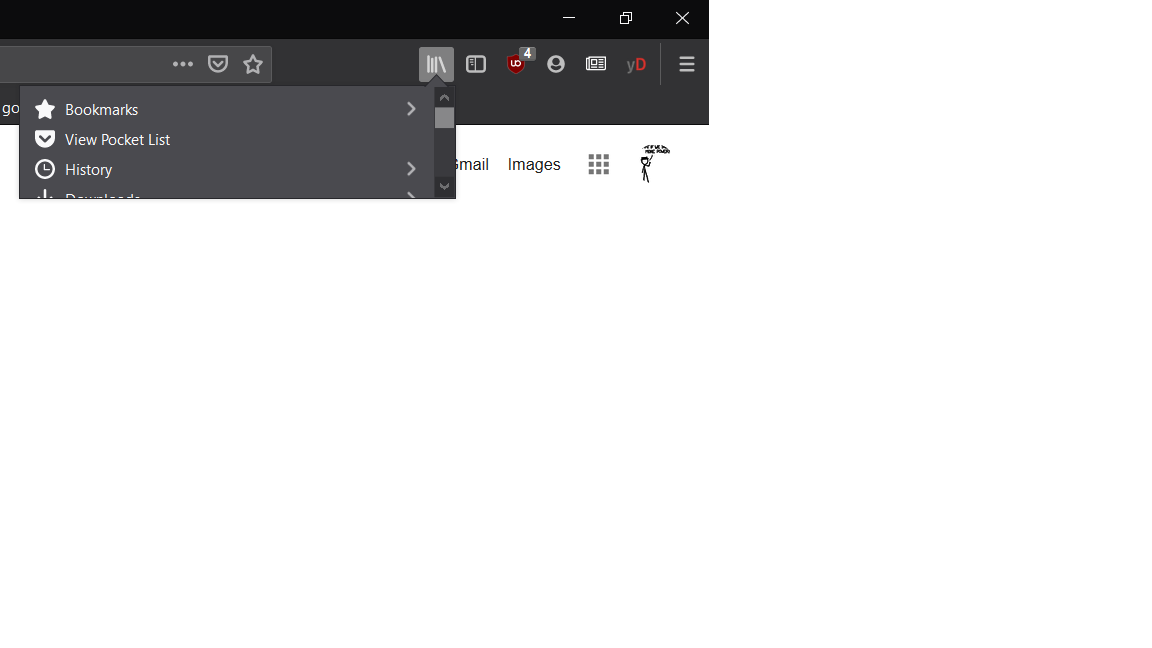
All the menus (library, extensions, "general" menu, firefox account) that can be open on the top right corner of my browser are too small (see attachment).
I could not find in the support pages how to change/reset it to a more normal height.
Do you know how to do that ?
Thanks.
Hello,
All the menus (library, extensions, "general" menu, firefox account) that can be open on the top right corner of my browser are too small (see attachment).
I could not find in the support pages how to change/reset it to a more normal height.
Do you know how to do that ?
Thanks.
All Replies (3)
Hi edern.haumont, please ignore the spam message with a phone number -- that's not official and we don't know what they will do to your system if you engage.
தீர்வு தேர்ந்தெடுக்கப்பட்டது
Ignore tobipix619's post, It's spam.
Hello,
- Type about:config in URL bar and press enter.
- Ignore the warning and click on Accept the Risk and Continue.
- Search for devp in Preferences.
- You will see layout.css.devPixelsPerPx with default value -1.25.
- Change it with 1.25.
- Click on tick icon.
- And, Restart the browser.
It will surely work. Thank You.
Shashank Shekhar மூலமாக திருத்தப்பட்டது
Thank you ! It was -1 but setting it to 1.25 solved it.