


How do I remove fake virus alerts

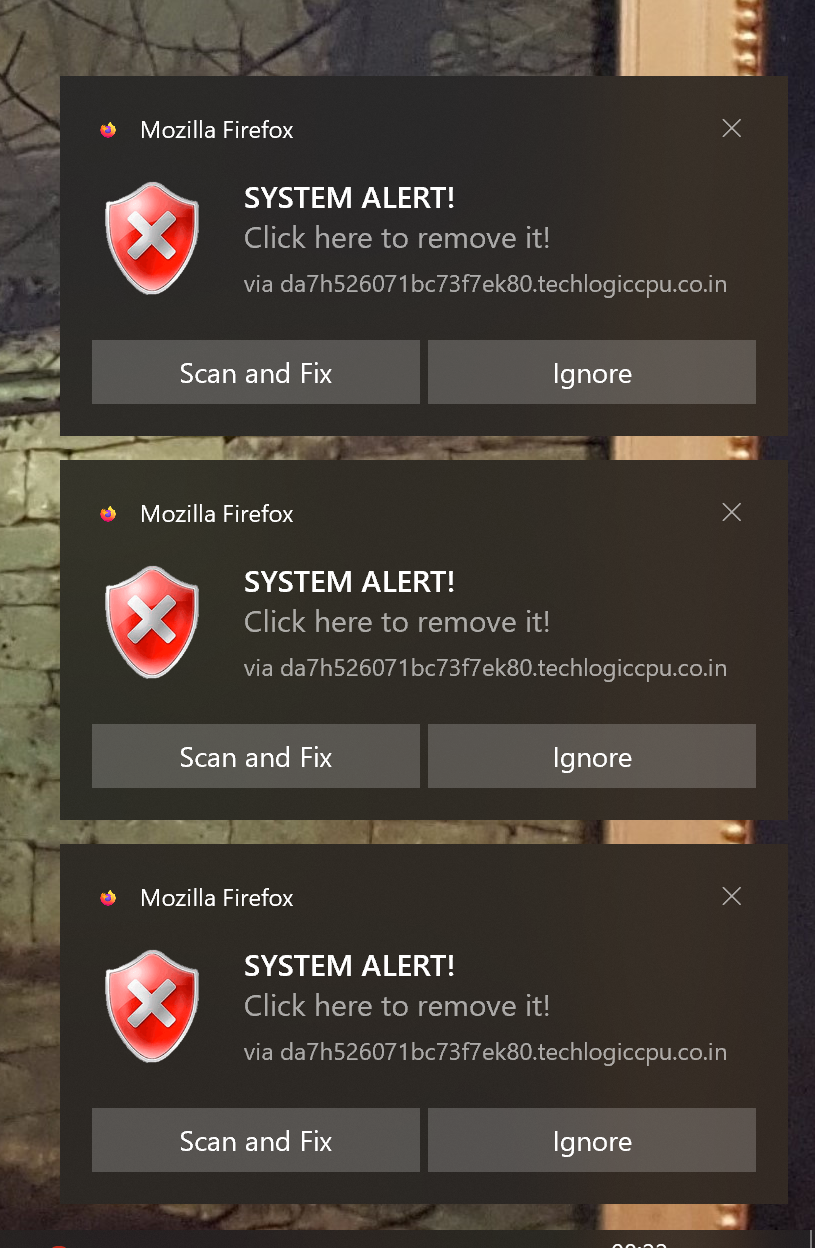
Pop ups appear when I start firefox saying "Trojan virus detected!" and "system alert!" including "remove virus now" button that if pressed takes me to a site which invites me to download what I assume is malware.
All Replies (3)
Hi! Those messages are not legitimate Firefox virus warnings. They are most likely scam/malicious website notifications designed to trick you into installing malware. Do not click “Remove virus now” or download anything from those pages.
Please try the following:
1. Close the warning without clicking any of its buttons or links. 2. In Firefox, go to Settings → Privacy & Security → Permissions → Notifications → Settings… 3. Look for websites you don't recognize and remove/block their notification permissions. 4. Check Settings → Add-ons and themes → Extensions and remove any extension you don't recognize. 5. Clear your browsing data/cache if the warnings continue. 6. Make sure your operating system and antivirus software are up to date, then run a full malware scan.
If the warning appears even when Firefox is not displaying a particular website, check Firefox's notification permissions first. Websites can send push notifications that look like system or antivirus alerts, but Firefox itself will not display a webpage saying that a Trojan has been detected and asking you to download software to remove it.
If you already clicked the button or downloaded/installed anything, don't run the downloaded file. Disconnect from the internet if you suspect something was installed and run a trusted malware scan.
Pop ups appear when I start firefox saying "Trojan virus detected!" and "system alert!" including "remove virus now" button that if pressed takes me to a site which invites me to download what I assume is malware.
Based on the screenshot these are just web push notifications from sites your have allowed to send your web push notifications. Instead of useful information some may send you junk, spam fake virus/trojan alters etc, You can revoke the sites from sending you notifications as per the KB article link.
Nathan Giovannini said
Hi! Those messages are not legitimate Firefox virus warnings. They are most likely scam/malicious website notifications designed to trick you into installing malware.
More specifically these are only Web Push Notifications as the notifications popup on bottom right corner of Firefox window. Most of the information posted in not needed besides the notifications part. https://support.mozilla.org/en-US/kb/push-notifications-firefox
Modified by James