


Open
When I click an email open, More than HALF the screen is taken up by a fixed Header. This leaves only 2" high to read the email. Can I change this and get a page to read the mail?l?

When I click an email open, More than HALF the screen is taken up by a fixed Header. This leaves only 2" high to read the email. Can I change this and get a page to read the mail? I do not half a page to see date and time etc. an no space to read the mail. Its terrible!
When I click an email open, More than HALF the screen is taken up by a fixed Header. This leaves only 2" high to read the email. Can I change this and get a page to read the mail?
I do not half a page to see date and time etc. an no space to read the mail.
Its terrible!
All Replies (4)
In the Thunderbird menu bar go to View > Headers and check ✓ Normal instead of All
Did Nothing. Problem is NOT resolved. Another option please
Follow the screen shot...
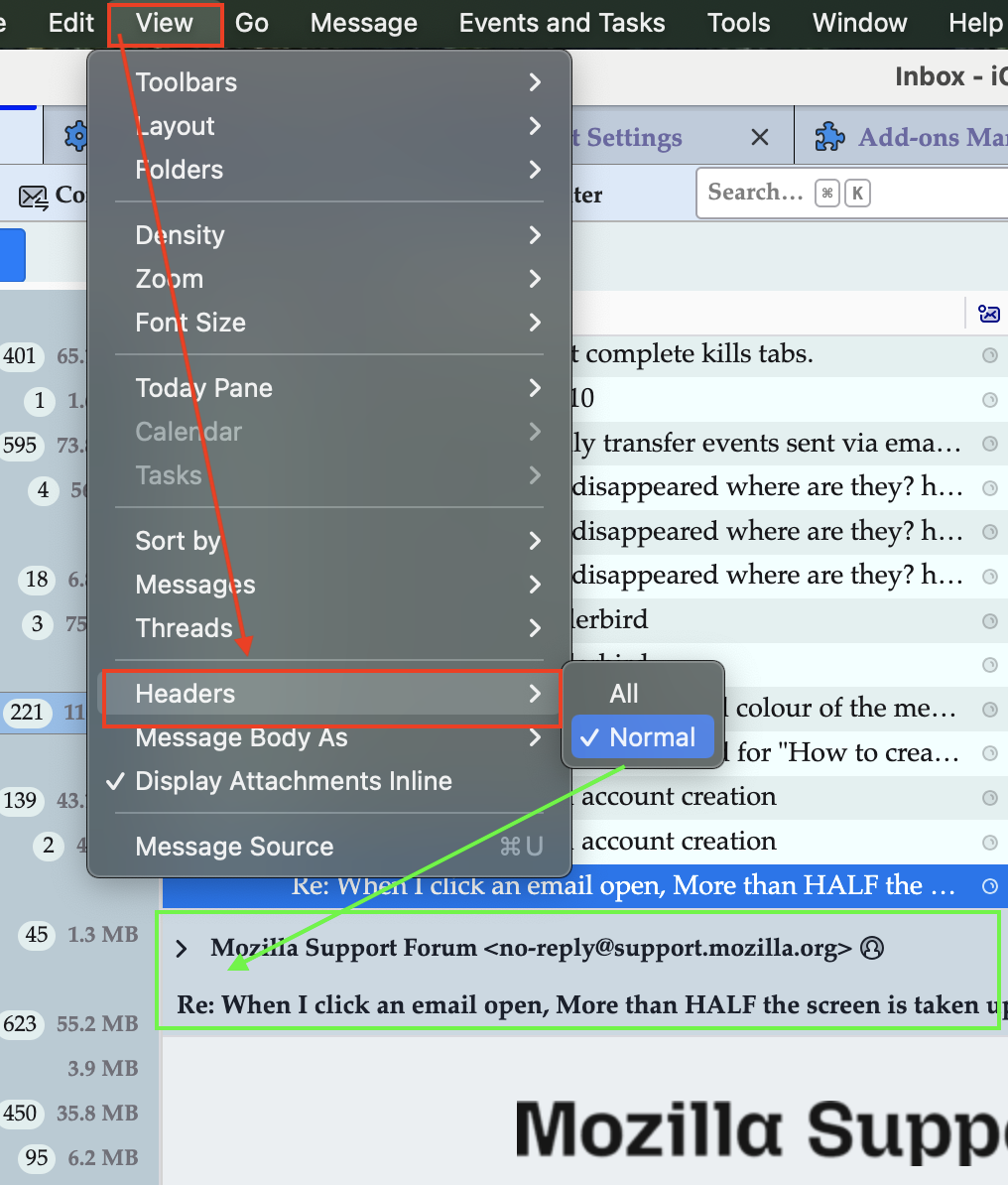
trying to change "View" then Header, makes no changes whatever. The Header still takes up over 60% of the page, leaving me with only one or maybe two lines of the e-mail visible.
The change you suggested made no difference.