


Messages missing in inbox (filtered?)

For some reason a filter is on to eliminate messages from my in box. I need to know how to turn off any filters?
All Replies (8)
Perhaps if you could describe what you think is missing someone might be able to point you in the right direction.
Only unread messages are showing in my inbox. It says all other messages are being filtered out. I have not initiated any filters. Read messages that have not been deleted are nowhere to be found. Deleted messages are in the deleted message folder.

Did you activate the Quick Filter bar and within it the "Show only unread messages" filter (see image) ?
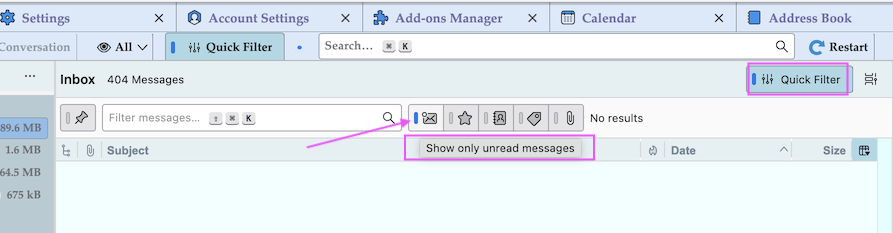
when I try to deactivate it by unchecking the unread and then hitting the blue checkmark at the top right it does not erase it. It goes back to having the unread checked again.
What do you mean by "blue checkmark at the top right"? To disable all filters in the Quick Filter bar click on the Quick Filter button as shown in my screen shot
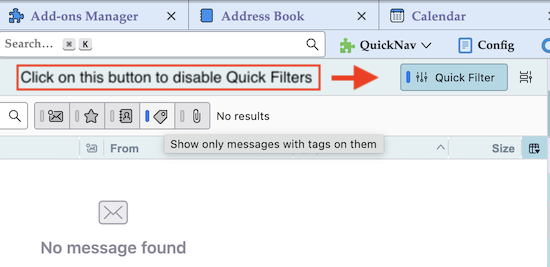
That is on my iphone. I have looked on my pc and can't find anything to do with a quick filter bar. On my iphone, when I go to the inbox it says at the bottom left "Filtered by Unreadv" in blue. When I hit that it goes to a Filters screen where unread is checked. When I hit the checkmark it goes away and then I hit a larger blue check in the upper right hand corner to execute but it does not remove the check and goes back to the inbox screen where is continues to say "Filtered by: Unreadv. In any case if I could go to the pc and turn it off that would be good. But I can't find where to do that in the program on the pc. (I appreciate your help-thank you).
Sorry, this is a Thunderbird forum. A Thunderbird version for iPhone is in development but not yet available.
OK. How do I get the filter turned off on my pc. If I correct it on the pc it will probably correct on my Iphone. I can't find the filter bar on the thunderbird software on my dell pc windows 11