


First, "unable to write," then "unable to open the summary file"

I'm dealing with a properly updated 'bird: 140.5.0 (32-bit) running on an equally updated Windows 10 desktop. First thing this morning, out of nowhere, I started getting an "unable to write the email to the mailbox..." message when sending, thus I could send but not save. And then I realized I wasn't receiving either, on all three accounts in my Thunderbird. I stopped everything and focused on trying to fix this. It's been an all-day, losing effort. So far.
I tried the various quick checks and fixes recommended here and there: I'm running the program as an administrator. I restarted the program. I rebooted the computer. I think I have enough disk space, but to be sure I deleted some bloat from possibly overly large files. I compacted, even though the program is configured to do that regularly. I temporarily disabled my antivirus program. I went into my webmail and deleted all messages that have arrived since my Thunderbird stopped receiving, in case one of them was corrupted. And probably some other attempts as well. Nothing has helped.
And now a second, even worse issue has fallen from the sky. Thunderbird opens. The folder list is where it always has been. The number of unopened messages in each folder is there in boldface, as always, but...the folders are all blank and I get the dreaded popup: "unable to open the summary file...." Have I lost my years' worth of carefully curated emails?
I've tried folder repair. I've deleted parent.lock. Etc. Nothing. Nothing. Nothing.
I will be super-grateful for any wisdom sent my way.
All Replies (17)
I tried renaming the IMAP INBOX.msf files and...success! Now I will try doing the same with the POP version. The POP emails are stored on the device, although I have Thunderbird configured to leave them on the server until I delete them, which I do fairly often, to keep the web storage fairly clean. I'm hoping I won't lose anything if this procedure is meant for IMAP only.
Aha. When I said success on the two IMAP accounts, that's only on the inbox of those accounts. If I try to open any other folder I get the "unable to open the summary file" popup. What does this tell us? Am I going to have to rename the other folders in those accounts? (I haven't yet had the nerve to rename the inbox on the POP file, the one that really matters.)

NoImprovement said
Am I going to have to rename the other folders in those accounts?
Yes - rename all the .msf files in every folder. I was hoping you wouldn't have to do that. Actually, you can just delete them.
Thanks hugely. I've just been able to play around a little so far, but I think I can safely say I'll be able to restore the inbox and other folders in all accounts--IMAP and the super-important POP account. But a big problem continues in the POP account: I still can send but not receive, and what I send can't be written to the Sent folder. This was the first issue that started the mess--first I couldn't save to Sent, then everything got hidden. Now, with the .msf files deleted and re-created, it seems in the POP account I can restore what's been hidden but can't write to either the Inbox or Sent folders. Any idea why that would be different from the IMAP accounts? Any idea what to do next?
FWIW, some further thoughts on my continuing "unable to write" problem.
1. I've read some in this community about global-messages-db.sqlite files, TB's search index. But shouldn't that have to do with existing messages, not with the problem of not being able to write to any folder in the POP account? Thanks to having rebuilt the .msf files, I no longer get the "unable to open the summary file" message; my hidden emails are now visible and readable. But incoming emails can't be written to the Inbox. Emails in the process of being composed can't be written to Drafts. I can't delete an email, because nothing can be written to Trash. I can't move an email from one folder to another. Etc.
2. Each time I reopen TB, I have to permit the program to make changes to the device. Why is this happening? Seems to me it ought to indicate something.
3. I first had this "unable to write" problem for several hours, or maybe a day, then "unable to open the summary file" took over and all messages were invisible until I rebuilt the .msf files. Coincidence? Or does "unable to write" lead inevitably to problems with the .msf files? Should I be worried that history will repeat itself? What causes a widespread problem that is resolved by rebuilding the .msf files? What typically causes "unable to write" in the first place?
4. The two IMAP accounts in this profile are OK since I rebuilt their .msf files; only the POP account can't be written to. So I don't think there's a general corruption of the profile. Does this seem correct to others who know a lot more than I know?
What next?
Without uninstalling, try reinstalling TB from https://www.thunderbird.net/en-US/. Your profiles will remain as is.
Will I end up with two Thunderbird apps, or will the new one simply move in and take over, leaving everything as it was: all my messages, settings...?
NoImprovement said
Will I end up with two Thunderbird apps, or will the new one simply move in and take over, leaving everything as it was: all my messages, settings...?
The latter. Make sure you reinstall the same version.
If it really won't change settings and lose all my stored messages, since I don't know what else to do I guess I'll try it...in the morning.
Thanks for your expertise and your patience.
NoImprovement said
If it really won't change settings and lose all my stored messages, since I don't know what else to do I guess I'll try it...in the morning. Thanks for your expertise and your patience.
Presuming the initial install wasn't customized, e.g. you installed it to C:\Program Files\Mozilla Thunderbird.
Copy the profile folder and paste it elsewhere just so you have a backup of it.
I've backed up my profile to another location and to a portable hard drive.
I do find C:\Program Files (x86) \ Mozilla Thunderbird, but in Troubleshooting Information the field Profile Folder / Open Folder (local drive) leads to C:\Users\[me]\AppData\Roaming\Thunderbird\Profiles
Is this normal?
Also, further observation: Thunderbird's Activity Manager confirms that there's no problem with my two IMAP accounts but with the key account (POP) "Could not connect to server...; the connection was refused." Not quite the same as "unable to write." Or is it just another way of saying the same thing?
Now, unfortunately, I have to leave town for a week, so this rescue effort will be delayed. When I'm back at it--probably Saturday, 20 December--should I pick up right here or start a new thread?
And meantime, one more big thankyou.
> I do find C:\Program Files (x86) \ Mozilla Thunderbird, but in Troubleshooting Information the field Profile Folder / Open Folder (local drive) leads to C:\Users\[me]\AppData\Roaming\Thunderbird\Profiles
Is this normal?
Yes. I forgot older versions installed in Program Files (x86).
> Not quite the same as "unable to write." Or is it just another way of saying the same thing?
No, not the same. 'Could not connect to server...; the connection was refused.' usually indicates an account configuration problem, but there are several other causes. Come back right here when you return.
I'm back. Nothing has changed except I've updated to 140.6.0.
To refresh, I have three accounts in Thunderbird: one POP, two IMAC. The IMACs are OK; the POP isn't. The problem account can't write, so no saving, no compacting, no deleting or other moving among folders, and the usual fixes fixed nothing. I can't recall just where I saw it--maybe in the Activity Manager, based on what I wrote above--but I came across a different error message in addition to the "can't write" messages I still receive: "Could not connect to server...; the connection was refused." Right now I can't seem to duplicate that message. All I see in the Activity Manager is a list of recent activities. Maybe that was some temporary thing?
I will note that each time I restart Thunderbird, I have to OK making a change to my device and Troubleshooting Information automatically opens.
That's the picture. Where next?
> Troubleshooting Information automatically opens
On that page, click the 'Clear startup cache' button. What happens after the restart?
> I have to OK making a change to my device
Check Windows services and see if the Mozilla Maintenance Service is disabled. It should be on Manual.
I have just read this lot and boy do I have questions and probably not a full understanding.
Why are you using a 32 bit version of Thunderbird? They are going out of fashion and really their intersections with 64bit operating systems are perhaps becoming somewhat problematical.
Second all this discussion about multiple versions of files and no one has addresses the elephant in the room. Why is there more than one file. Have you tried your operating system in safe made (you need a wired internet connection and they are becoming rare in some countries)
Almost all issues where writing to disk is an issue come from a very few causes and none to my knowledge are Thunderbird.
1. A corrupt hard disk. Have you checked the physical integrity of the data on the disk? You appear to be using Windows so the tool you would need to use would be chkdsk. It is a standard part of windows. I suggest this because you are asked on each start of Thunderbird to allow changes. This would be Thunderbird checking the default mail news and calendar client for Windows and setting itself to perform those functions. There are only two possible reasons for that to be on repeat. The settings is being changed between starts or the disk is corrupt and the changes are not saved. The easiest top check is the disk integrity.
When it comes to things reverting or modifying system defaults what other application is prompting you for the same thing. Perhaps outlook? that could also be setting up this repeated asking for the same changes.
2. An overactive antivirus/security suite. Unfortunately this is a major growth industry with antivirus products becoming more aggressive in their settings and scanning to the point that they often prevent Thunderbird from saving changes or getting mail. They are a primary cause of file contention which bubbles up to the surface as inability to write to disk or update settings or even persist open tabs between sessions. In extreme cases account can be added and are missing following restarting Thunderbird.
I see nothing in this discussion about antivirus. You might want to try uninstalling yours if it is other than Windows defender and see if things improve. Not windows defender will step in one uninstall a third part product, you will not be left without protection. Using your operating system in safe mode with networking will achieve the same thing for the duration of the safe mode, so that is the preferred diagnostic step. I hate uninstalling and reinstalling anything.
3. VPN usage. While the issues here do not indicate a VPN problem many of the larger providers are attempting to detect fraudulent use of your mail account and many treat a VPN connection very suspiciously. I would suggest not using one while trying to determine what the underlying issues are.
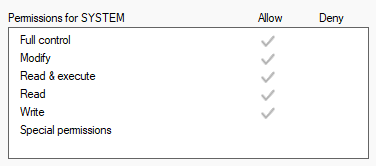
4. The generally least likely on Windows but still an item to be checked are file permissions. These are far more relevant on Linux/Unix systems as they have a far more finely implemented set of user permissions than Windows has. When you select files in your profile and look at the properties. Do you actually have more than read access to them. It used to be files copied from CD were by default read only because the CD was read only and that caused issues frequently. CD usage is down, but the possibility is still there that you do not have the correct write/allocate execute access.
Windows displays file access privileges in the security tab of the file properties dialog as shown below.
 ile contention whee two applications are attempting to access the same file at the same time resulting in failures in one application or another. Generally the one that was seeking to modify the content of the file. In addition to the backup situation there is also the scanning of modified files by virus products, this becomes a problem when the file in question is huge, as Thunderbird mail files tend to be, and it is also in a streaming backup situation to one drive et. al.
Now Comcast are in the midst of a very major mail migration to Yahoo, are you involved in that? your mail provider has not been mentioned as far as I can see.
Just how large is your inbox file on disk. Right click the folder select properties and lok to the size in the dialog.
Just to add to the complexities of the situation, modern operating systems have a what I consider sad penchant for cloud backups, this in itself can cause contention as it actually takes a long time to upload a new copy of a 6Gb inbox file. Especially when upload speeds are frequently limited to 10% of the advertised download speed of the plan To illustrate the detail in the link are for Starlink showing significantly lower upload speeds for all plans. Their uploads ration is actually fairly generous relative to other providers
Ed:
After I push 'Clear startup cache' button, a popup says restart won't change settings or remove extensions; when I click restart, nothing happens. If I manually close and reopen the program, I have to OK the app making changes to the device and it reopens same as before, directly to the Troubleshooting Information page with a popup saying "unable to write"--referring to the POP account that's giving me all this trouble.
Mozilla Maintenance Service is on Manual.
Matt:
The desktop is 15 years old. I suppose it was 32-bit originally, when I first downloaded Thunderbird; I updated to Win 10 only three or four years ago. Anyhow, the OS is now 64-bit. Thunderbird isn't.
I have run chkdsk; no problem detected.
I temporarily disabled my outside antivirus; no effect.
Not using a VPN.
Write permission: Well, I find this peculiar. In the Security tab on folders, subfolders, and sub-subfolders, Write is checked, as in your image. But in the General tab in parent folders, under Attributes, "Read-only (only applies to files in folder)" is checked. When I uncheck it, click Apply and OK, and go back, it's still checked "Read-only.". Yet whatever is inside is Write permitted.
Nothing to do with Comcast or Yahoo.
Inbox is 1G.
No cloud backup, although I perhaps should explain that this POP account is through my own domain, so Thunderbird is pulling email from my webmail. Again, Thunderbird continues to do fine with two IMAC accounts. It's the third account--a POP account--that's messed up.