


My Firefox desktop internet shortcuts are all blank

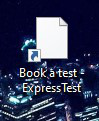
I'm not completely sure as to how it occurred, but all my internet shortcuts that I have on my windows 10 desktop have now turned blank as per the attached screen print.
How can I reinstate the graphic that previously appeared on the icon?
Thanks.
Steve
All Replies (5)

If you click on the icons, do they still work?
Try making Firefox your default browser again.
If that does not work, make something else the default. If there is a change, then try Firefox again.
https://support.mozilla.org/en-US/kb/how-make-web-links-open-firefox-default
https://support.mozilla.org/en-US/kb/setting-firefox-default-browser-does-not-work
https://support.mozilla.org/en-US/questions/1207775
https://support.mozilla.org/en-US/questions/1208759#answer-1086882
https://support.mozilla.org/en-US/kb/how-change-your-default-browser-windows-10
https://www.bing.com/search?q=change+default+browser+windows+10
The icons still work, but the graphic image on the icon has disappeared. See the attached screen print.

Did you follow my instructions (above)?
Right-click on one of the shortcuts.
Select Properties. Under General, look for Opens With and press Change.
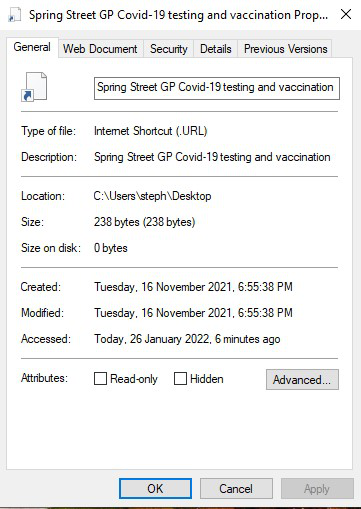
The OPENS WITH option does not appear when selecting Properties and then General
See attached screen shot.
The instruction I posted is for opening a file. I guess it's no good for links.
You should also try asking here: https://support.microsoft.com
http://answers.microsoft.com/en-US/windows/forum/windows_10
I called for more help.