


Why is the logo image not displaying in Firefox?

The logo image for one of my sites is not displaying. The alt info for the image is being displayed. This is a relatively new problem. In older versions of Firefox the image displayed fine. The image also displays fine in Webkit browsers and IE10. This is a Firefox specific problem. The main URL for the site is: http://sabaki.aisites.com/dbs323/project/masterAi.php
If you go to that URL in Firefox you'll see "logo gif" split onto two lines and before the "COTin" text. If you view the same URL in Chrome or IE10, you'll see the image. I have screenshots of the problem, but there is no way to include them here.
Vald lösning
Thanks, the shift+reload worked on the second attempt. Interesting as I had flushed the cache numerous times previously (on prior days over the last month). Good trick to know.
Alla svar (3)
Here's the images I couldn't attach in the original post above.
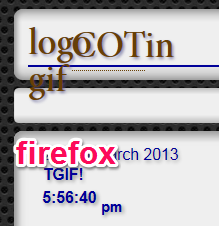
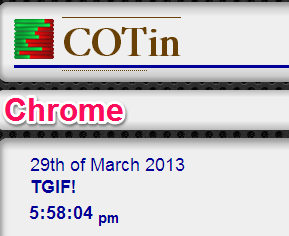
Works fine here.
Reload web page(s) and bypass the cache to refresh possibly outdated or corrupted files.
- Press and hold Shift and left-click the Reload button.
- Press "Ctrl + F5" or press "Ctrl + Shift + R" (Windows,Linux)
- Press "Command + Shift + R" (MAC)
If you use extensions (Tools > Add-ons > Extensions) like Adblock Plus or NoScript or Flash Block that can block content then make sure that such extensions aren't blocking content.
Start Firefox in Safe Mode to check if one of the extensions (Firefox/Tools > Add-ons > Extensions) or if hardware acceleration is causing the problem (switch to the DEFAULT theme: Firefox/Tools > Add-ons > Appearance).
- Do NOT click the Reset button on the Safe mode start window or otherwise make changes.
Vald lösning
Thanks, the shift+reload worked on the second attempt. Interesting as I had flushed the cache numerous times previously (on prior days over the last month). Good trick to know.