

Windows 10 reached EOS (end of support) on October 14, 2025. If you are on Windows 10, see this article.

Kërkoni te Asistenca

Shmangni karremëzime gjoja asistence. S’do t’ju kërkojmë kurrë të bëni një thirrje apo të dërgoni tekst te një numër telefoni, apo të na jepni të dhëna personale. Ju lutemi, raportoni veprimtari të dyshimtë duke përdorur mundësinë “Raportoni Abuzim”.

Mësoni Më Tepër
Arkivuar

How can I add a button that opens a new tab?

user1086202

How can I quickly open a new (blank) tab without going to File --> Open New Tab. There has to be a button I can add or a box that isn't checked somewhere. I used to be able to click in the blank space in the row of tabs to open a new tab, but with this latest Firefox update, if I click in the blank space now, it just "restores" my browser window.

To explain further - I know I can middle-click a link to open it in a new window, but if I'm on one page reading an article, and I want to open a new tab to look up a word or map or whatever, I need a faster way to open a new blank tab.

How can I quickly open a new (blank) tab without going to File --> Open New Tab. There has to be a button I can add or a box that isn't checked somewhere. I used to be able to click in the blank space in the row of tabs to open a new tab, but with this latest Firefox update, if I click in the blank space now, it just "restores" my browser window. To explain further - I know I can middle-click a link to open it in a new window, but if I'm on one page reading an article, and I want to open a new tab to look up a word or map or whatever, I need a faster way to open a new blank tab.

Krejt Përgjigjet (2)

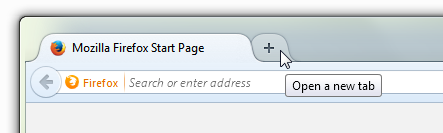
hello, there should be a new tab button at the end of the tab strip...
You are right - there should be and there is on my windows 7 machine but not on my windows 8.1 machine. Firefox add-ins are identical. So how do I get the new tab button back?