


It's a Ubuntu-distributed Firefox. I cannot find a way to import bookmarks file, there's no "import" button.
I am trying to import Google's Favorites file with bookmarks. All instructions I find tell me to "Bookmarks -> Organize Bookmarks (or Show all Bookmarks)-> Import and Backup -> Import HTML... -> from an HTML File"
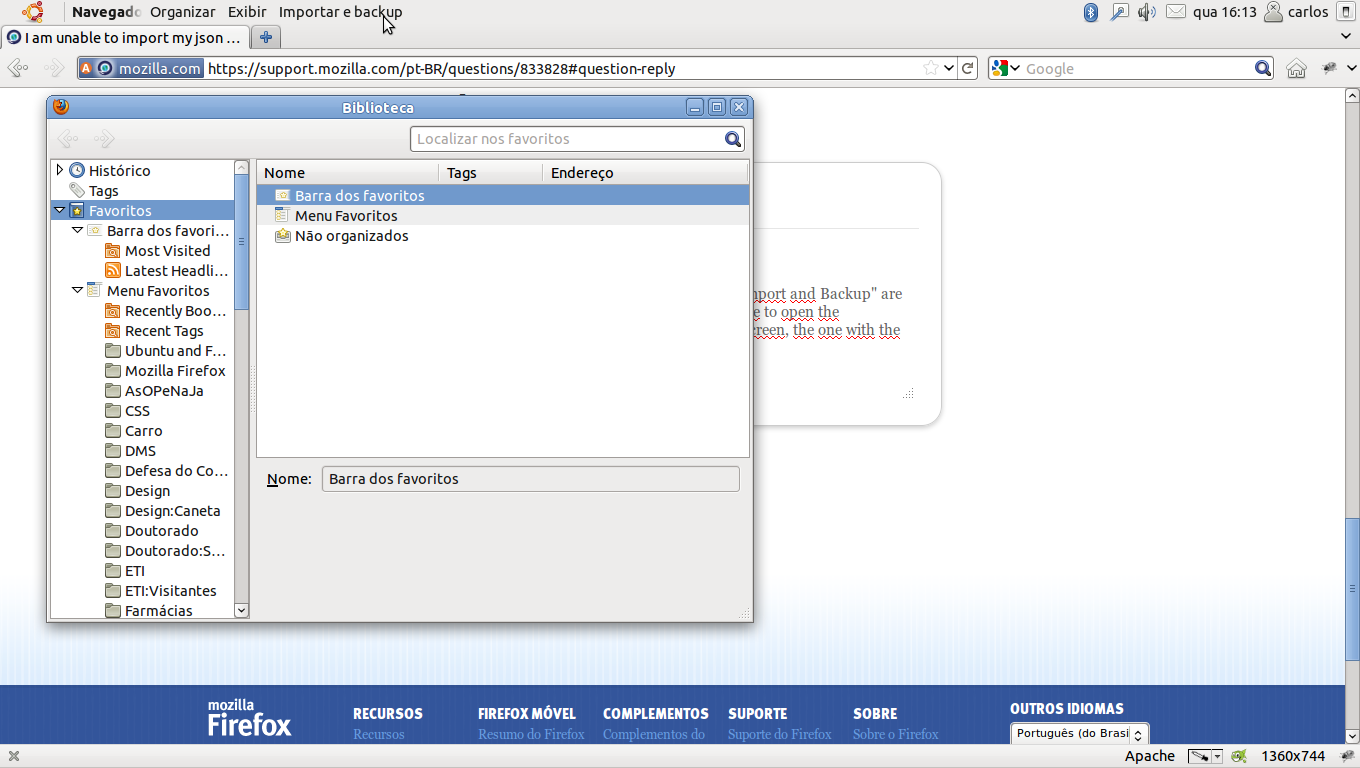
The problem is the absence of that "Import and Backup" button. Is it because I'm using Ubuntu's version of Firefox 5?
I am trying to import Google's Favorites file with bookmarks. All instructions I find tell me to "Bookmarks -> Organize Bookmarks (or Show all Bookmarks)-> Import and Backup -> Import HTML... -> from an HTML File"
The problem is the absence of that "Import and Backup" button. Is it because I'm using Ubuntu's version of Firefox 5?
Krejt Përgjigjet (2)
I think I got it!
Actually help came from anothe post, mentioning keyboard shortcuts. Anyway, this is the deal:
On Ubuntu (at least) the options "Organize", "Show" and "Import and Backup" are hidden on top of the screen, not on the window bar. You have to open the "Favorites">"Show All" and hover the bar on the top of the screen, the one with the Ubuntu logo ont the left.
See also: