


Vertical Tabs not rendered

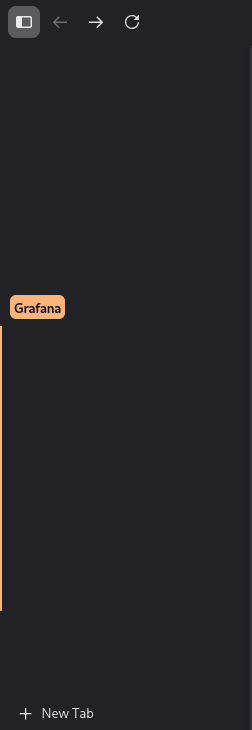
I love vertical the tab view. Unfortunately, on one of my systems, vertical tabs to not render correctly. Groups are shown, but there are no favicons or titles shown (see attached image). The tabs are also not clickable. Any insight into how I could debug that would be amazing!
Zgjidhja e Zgjedhur
Hello everyone,
thanks for all the ideas!
I tried troubleshoot mode already, that did not help.
I tried creating a profile, which actually did not work when I first tried it before posting here, but after another try, I got a new profile with working vertical tabs and the current Firefox design. The existing profile was stuck on an old design. Also, I tried copying the profile to the other system - it also didn't work there.
As the problem apparently was in the profile, I just bit the bullet and recreated all my profiles, now also in the new profile manager. Could keep everything via Mozilla Account Sync and copying `sessionstore.jsonlz4` over to the new profile. Just had to log in everywhere and set up extensions again. Now, only importing auth certificates is left as copying `keys.db` and the logins data as described here here did not work for some reason.
Now, everything works great, guess the refresher was necessary after carrying over the profile for at least a decade.
Thanks for the help!
Ndryshuar nga peet
Krejt Përgjigjet (5)
What's the difference between systems ??
Nothing obvious. They are both Manjaro, using the same kernel (6.18.33-1-MANJARO), fully up to date. They were both initially installed with Cinnamon (xorg) and then later switched to Gnome (wayland). Of course, they have different packages installed, but nothing that obviously affects rendering in Firefox.
I hoped someone has an idea here about how I might get useful information out of firefox, e.g. how to narrow down logging to modules that are relevant tho the application rendering, in case firefox logs something when trying to render the tabs.
Can you copy the Profile from one to the other?
You can try to see if anything improves if you restart to Use Troubleshoot Mode in Firefox via Help menu — or potentially Manage Firefox profiles to create a temporary new profile to see if that one is also affected?
Zgjidhja e Zgjedhur
Hello everyone,
thanks for all the ideas!
I tried troubleshoot mode already, that did not help.
I tried creating a profile, which actually did not work when I first tried it before posting here, but after another try, I got a new profile with working vertical tabs and the current Firefox design. The existing profile was stuck on an old design. Also, I tried copying the profile to the other system - it also didn't work there.
As the problem apparently was in the profile, I just bit the bullet and recreated all my profiles, now also in the new profile manager. Could keep everything via Mozilla Account Sync and copying `sessionstore.jsonlz4` over to the new profile. Just had to log in everywhere and set up extensions again. Now, only importing auth certificates is left as copying `keys.db` and the logins data as described here here did not work for some reason.
Now, everything works great, guess the refresher was necessary after carrying over the profile for at least a decade.
Thanks for the help!
Ndryshuar nga peet