


unable to find the browser signin option

Hello Team,
On the Firefox browser I am unable to find the option where in I can log in to my account so that I can sync my passwords from the old machine.
Kindly advise.
Regards
Sanjai
Zgjidhje e zgjedhur
Sanjai said
On my old official machine all my user names and passwords were synced. I have the access to the machine in case anything needs to be checked. I can check it.
I would think that about:policies does not list DisableFirefoxAccounts as an active policy on that system, but either way, that doesn't help with the new profile.
Since you still have access, you could transfer your saved logins manually through a CSV file, or using a different password manager. (The CSV import is currently disabled due to some performance-related bugs, but can be enabled by toggling the signon.management.page.fileImport.enabled preference... assuming that's not blocked by policy.)
Lexojeni këtë përgjigje brenda kontekstit 👍 1Krejt Përgjigjet (13)
It should be on the main menu: How do I set up Sync on my computer?
Hello @Jscher2000,
Thank you for your quick response, however under the three lines on the top right of browser, I can't see the option to sign in and sync.
Regards
Usually it is next to the phrase "Sync and save data". (After you are signed in, this row is replaced with your email address.) You also could go to the Settings page and click Sync in the left column.
Oh... I have Firefox 112 and you have Firefox 102. I think it was the same back then, but I don't have it in front of me.
I can't find it on the settings page on the left hand side as well
Attached is the screenshot for your reference. Do you want me to upgrade the firefox version?
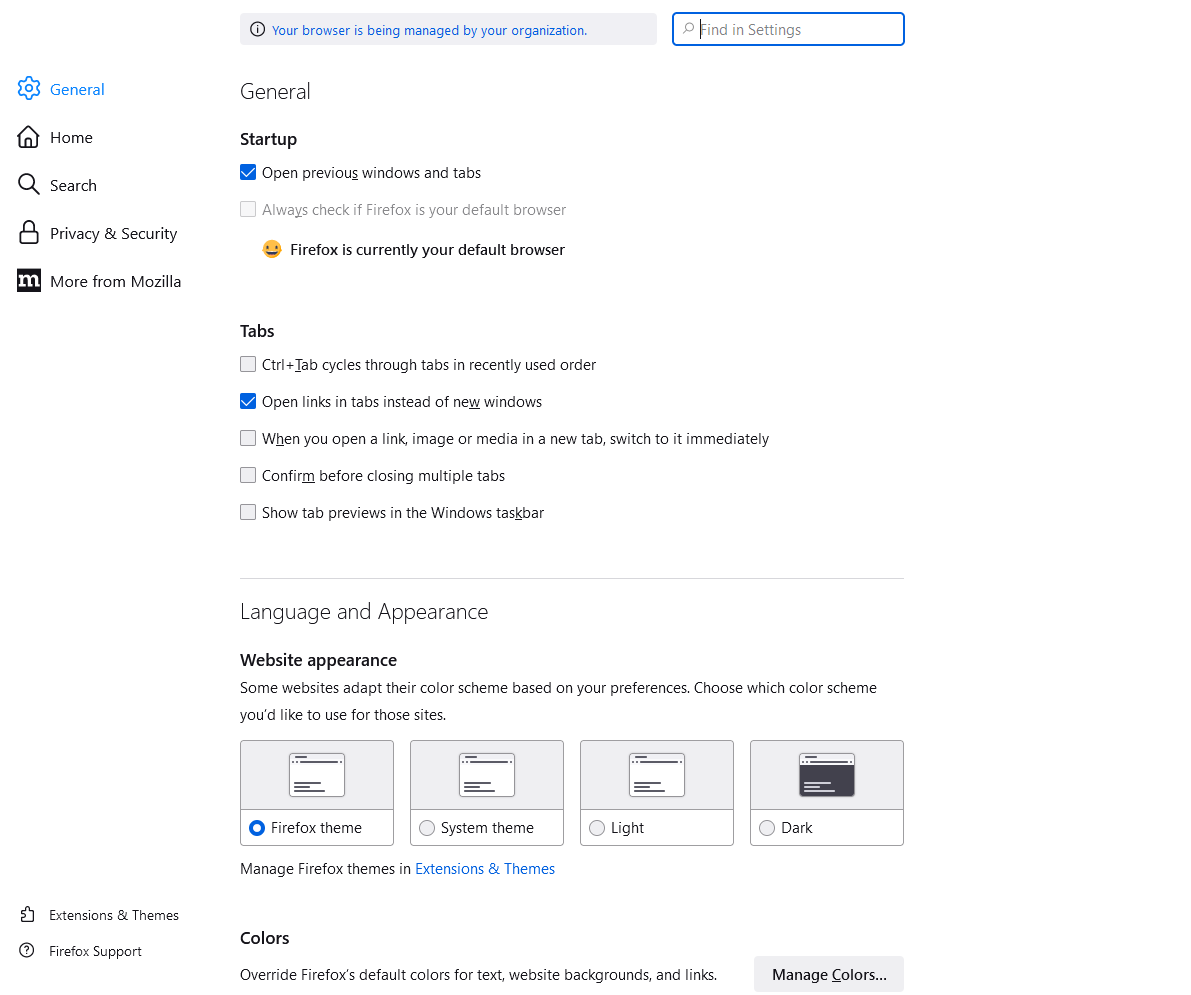
Oh... do you see that blue text to the left of the search box? I wonder if Sync is blocked on your Firefox by company rules. To check on that, type or paste about:policies in the address bar and press Enter to load that page. The "Active" panel normally says "The Enterprise Policies service is inactive." but my guess is that yours lists some active policies including the DisableFirefoxAccounts policy.
Could be that Sync has been disabled by the DisableFirefoxAccounts policy or by your IT department.
You can click the "Your browser is being managed by your organization" notification or open the about:policies page to see if policies are active and if errors are reported.
I don't think there is a restriction in policies to disable Sync, I recently got a new machine replaced with an old one has the option of Sync. Most of the things are allowed as checked on the policy page.
Policy Name Policy Value DontCheckDefaultBrowser true DisableFirefoxAccounts true DisableTelemetry true DisablePocket true OverrideFirstRunPage "" OverridePostUpdatePage "" WindowsSSO false DisableFirefoxStudies true BackgroundAppUpdate false AppAutoUpdate true
> DisableFirefoxAccounts true
In this case, "true" means that they are DISabled.
Possibly your IT doesn't want mixing of personal and work data in your Firefox Account.
Hello @Jscher2000
On my old official machine all my user names and passwords were synced. I have the access to the machine in case anything needs to be checked. I can check it.
In case I need to upgrade the browser on new machine and if it will help let me know please.
Regards

Open the menu in the top right of Firefox and select “Sign in to Sync”. Click “Get started” in the tab that opens. Enter an email address and password to “Create a Firefox Account.”
Zgjidhja e Zgjedhur
Sanjai said
On my old official machine all my user names and passwords were synced. I have the access to the machine in case anything needs to be checked. I can check it.
I would think that about:policies does not list DisableFirefoxAccounts as an active policy on that system, but either way, that doesn't help with the new profile.
Since you still have access, you could transfer your saved logins manually through a CSV file, or using a different password manager. (The CSV import is currently disabled due to some performance-related bugs, but can be enabled by toggling the signon.management.page.fileImport.enabled preference... assuming that's not blocked by policy.)
Hello @JScher2000
Thank you for sharing step by step guidelines on how to import passwords, after enabling the import feature. It worked well and all is sorted.
Appreciated!
Regards
Note that you might not be able to Sync logins imported via a CSV file.