


Windows 10 reached EOS (end of support) on October 14, 2025. If you are on Windows 10, see this article.

Kërkoni te Asistenca

Shmangni karremëzime gjoja asistence. S’do t’ju kërkojmë kurrë të bëni një thirrje apo të dërgoni tekst te një numër telefoni, apo të na jepni të dhëna personale. Ju lutemi, raportoni veprimtari të dyshimtë duke përdorur mundësinë “Raportoni Abuzim”.

Mësoni Më Tepër
Arkivuar

Add account Error messages

david replied
davidovic

Hi Thunderbird support team,

I added some accounts successfully, but for others I got error messages.

For Outlook, I managed to add 2 accounts, but for the third one I got the error message as in the first attachment. Similarly, for Gmx, I added one account, but for the other, I got the error message as in the second attachment.

What do these messages mean, and how can they be corrected to successfully add the accounts?

I would like to point out that I can log into my email accounts, my credentials are correct. I enter the same in Thunderbird.

Thank you very much
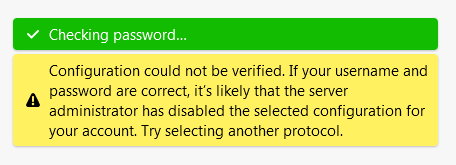
Hi Thunderbird support team, I added some accounts successfully, but for others I got error messages. For Outlook, I managed to add 2 accounts, but for the third one I got the error message as in the first attachment. Similarly, for Gmx, I added one account, but for the other, I got the error message as in the second attachment. What do these messages mean, and how can they be corrected to successfully add the accounts? I would like to point out that I can log into my email accounts, my credentials are correct. I enter the same in Thunderbird. Thank you very much
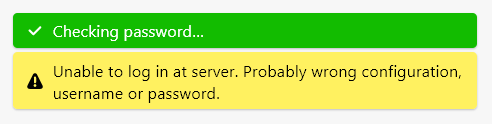
Foto të bashkëngjitura ekrani

Krejt Përgjigjet (1)

My suggestion is to first review carefully what you have. From your post, you have five accounts, which means there should be five incoming servers defined and five smtp servers defined, each with unique settings. That is, you might find than an smtp server is identified with the wrong account. This may not be the problem, but it is a common situation when setting up multiple accounts.