File upload dialog not appearing

I'm running Firefox 99.0.1 on Ubuntu 22.04. Recently (I think since I updated to Ubuntu 22.04 about a week ago), Firefox has been refusing to show me file upload dialogs. When I click a button that's supposed to give me one, nothing happens.
This has been happening with: - The "attach files" button in Gmail - A file upload button on Gradescope (website for managing homework assignments) - File -> Open File... and Ctrl+O.
Dragging and dropping a file onto an email in Gmail does attach the file -- it's just that the button doesn't work.
I've tried restarting, and I've tried running Firefox in Troubleshoot Mode -- so far nothing has fixed the problem. What else should I do?
Zgjidhje e zgjedhur
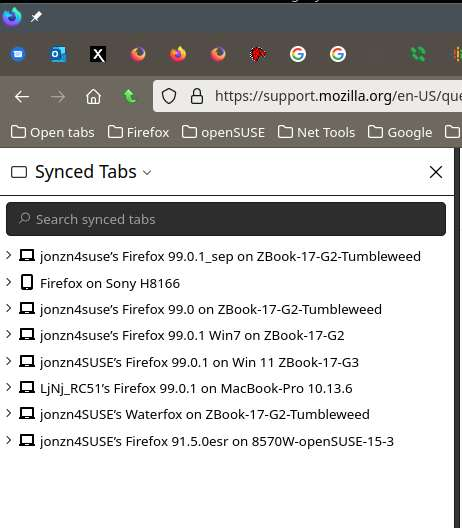
Your issue is with your OS version of Firefox. I stopped using my distro version as my daily driver about 2yrs ago. I run several version of Firefox, but my daily driver is Nightly. see old screenshot I would suggest run Mozilla's version and other versions as backup. The choices is yours. ;-)
Lexojeni këtë përgjigje brenda kontekstit 👍 0Krejt Përgjigjet (5)
Try downloading another copy of Firefox, run it from the folder and see if you have the same issue. https://www.mozilla.org/en-US/firefox/all/#product-desktop-release
That worked! (Though I discovered another problem while trying to do it -- attempting to download a file, like with the "Download Firefox" button on that page, also doesn't work.)
I had originally installed Firefox via snap. Should I just run that new copy instead, or is there a way of fixing whatever version I installed?
Zgjidhja e Zgjedhur
Your issue is with your OS version of Firefox. I stopped using my distro version as my daily driver about 2yrs ago. I run several version of Firefox, but my daily driver is Nightly. see old screenshot I would suggest run Mozilla's version and other versions as backup. The choices is yours. ;-)

Got it, thanks for your help! I didn't realize there was a difference between the distro version and the one from the Mozilla website - they have the same version number!
FYI... I sync data between multiple versions of Firefox as backup. Sync in not a backup service. see screenshot