


Why doesnen't LIFELOCK work with Firefox

I open a tab for lifelock.com, go to login to my account, enter my correct username and correct password, click login - system responds either "please refresh browser and try again" or "response taking too long try again later", none of which work.
Within a few seconds, I open microsoft explorer, get to lifelock, login, OK.
What's up?
DougW
Krejt Përgjigjet (1)
This issue is likely caused by an extension that you have installed on Firefox. uBlock Origin, Norton Identity Safe and other similar extensions are known to cause issues with logins on certain websites because they are designed to block certain content.
Try Firefox Safe Mode to see if the problem goes away. Firefox Safe Mode is a troubleshooting mode that temporarily turns off hardware acceleration, resets some settings, and disables add-ons (extensions and themes).
If Firefox is open, you can restart in Firefox Safe Mode from the Help menu:
- Click the menu button
 , click Help
  and select Restart with Add-ons Disabled.
If Firefox is not running, you can start Firefox in Safe Mode as follows:
- On Windows: Hold the Shift key when you open the Firefox desktop or Start menu shortcut.
- On Mac: Hold the option key while starting Firefox.
- On Linux: Quit Firefox, go to your Terminal and run firefox -safe-mode
(you may need to specify the Firefox installation path e.g. /usr/lib/firefox)
When the Firefox Safe Mode window appears, select "Start in Safe Mode".
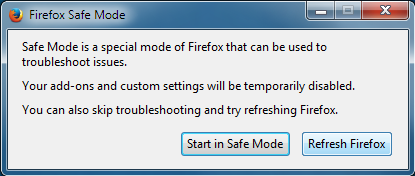
If the issue is not present in Firefox Safe Mode, your problem is probably caused by an extension, theme, or hardware acceleration. Please follow the steps in the Troubleshoot extensions, themes and hardware acceleration issues to solve common Firefox problems article to find the cause.
To exit Firefox Safe Mode, just close Firefox and wait a few seconds before opening Firefox for normal use again.
When you figure out what's causing your issues, please let us know. It might help others with the same problem.